Suno V6: Build It So It Holds,
Then Even Out What Drifts
In our last article we measured how Suno V6 runs out of steam: over the length of a song it gets louder, narrower and darker, while v5 and v5.5 did not. This one is about what to do about it. First, how to get material out of V6 that holds to the last chorus. Then, when a take drifts anyway, what can be evened out before mastering, and what cannot.
Build it so it holds. Widest material early, identical choruses, a short and narrow ending, a centred arrangement. Two of our three songs built this way did not drift at all.
When it drifts anyway, fix that before you master. Smart Preparation, a new step in MasterForge Preparation, measures the drift like with like and evens the end out to the beginning: level, tone and stereo width. Songs that do not drift are left untouched. Master a drifting take as it is, and mastering locks the drift in.
What no processing brings back: lost words, smeared kick drums, glitches. Those need a new take or a replaced section.

Hear it first: Same Old Song
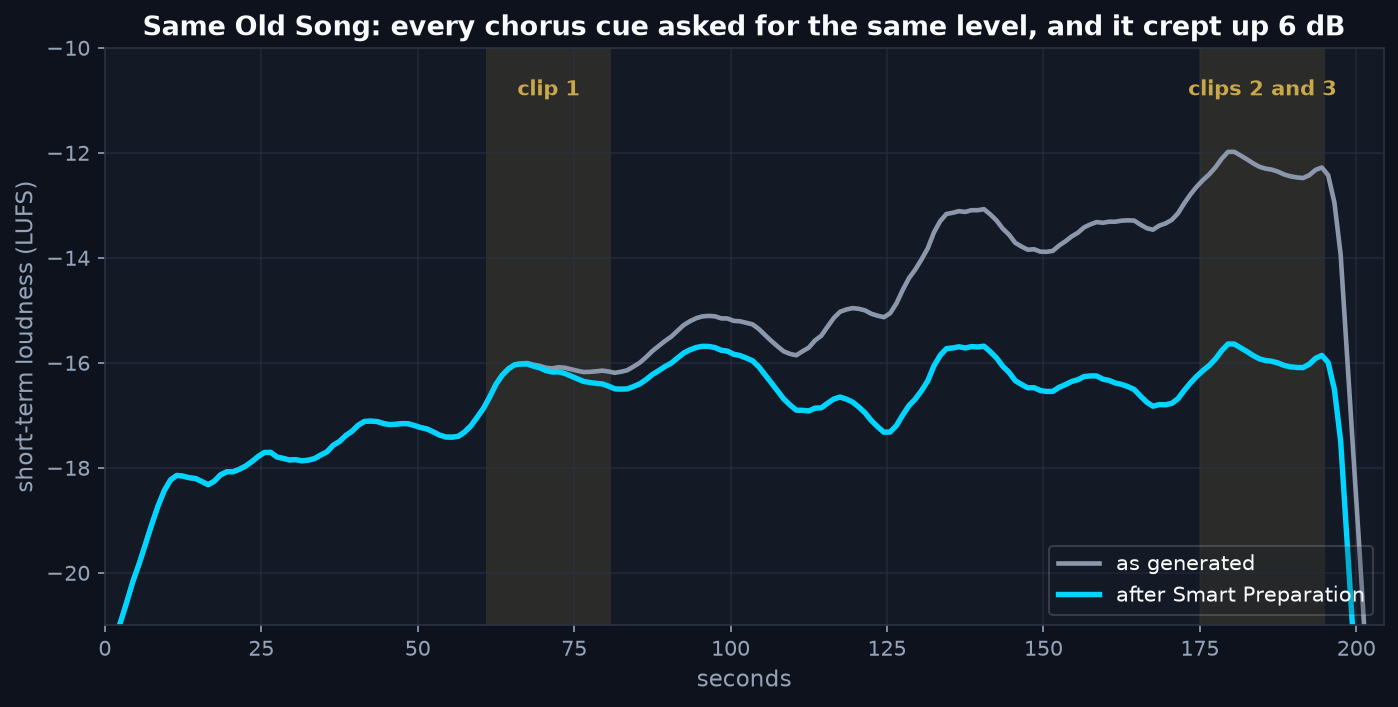
This is preparation, not mastering. Nothing here is mastered and nothing is loudness matched: all three clips play at their original levels. As generated, the ending is 3.9 dB louder than the same music at 1:00. After Smart Preparation it is within 0.2 dB of it. Louder is not better here: the ending should sound like the same song as the first clip, and only then is the song ready to be mastered.
Seeing a song's shape
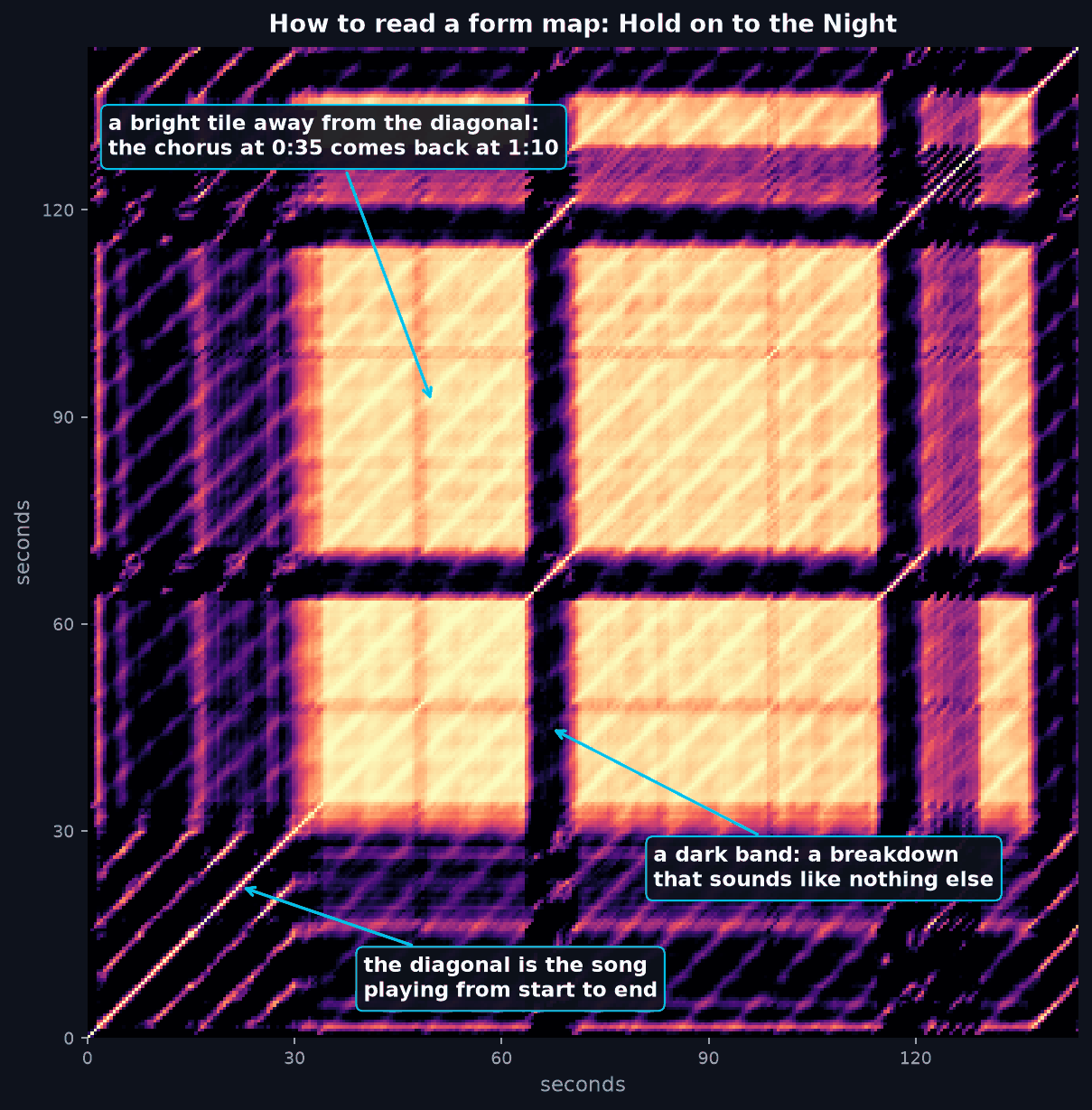
Take a song's harmony beat by beat and compare every moment with every other. Moments that sound alike light up. What comes out is a picture of the song's form.
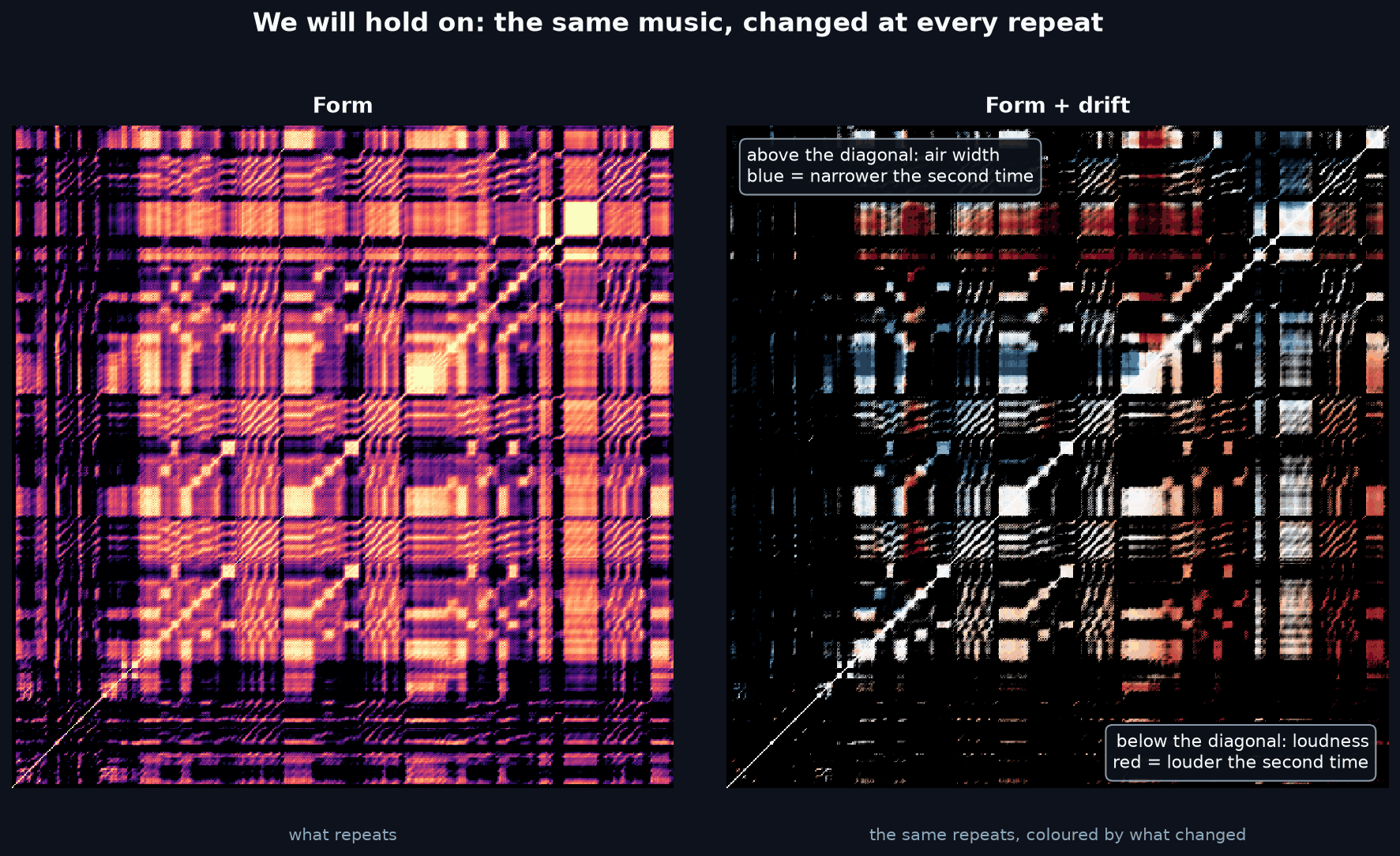
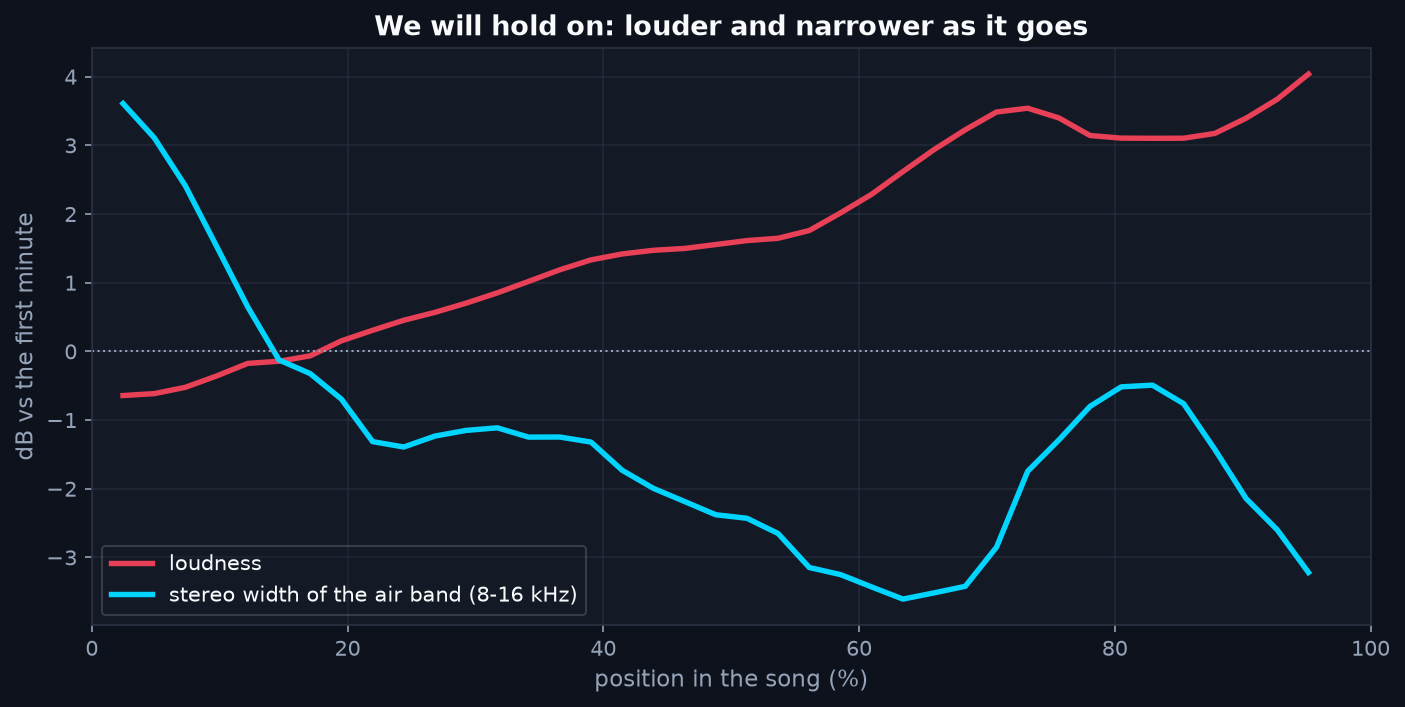
A song that holds keeps the same pattern to the end. A song that drifts still repeats its music, but the repeats no longer sound the same. Colour the repeats by what changed and the drift becomes visible:
Part 1: Get better material out of V6
These are the rules we now follow for every V6 song. Each one comes from a measurement in the last article.
- Put the widest material early. The chorus straight after the intro, the richest part of the arrangement in the first 10 to 40 percent of the song, where V6 is still at its best.
- Write the choruses word for word the same. If the last chorus collapses, it can then be replaced with the first one in an editor.
- Keep the ending short and narrow. The last chorus earlier, an outro of four to eight bars, piano and one voice. The model's narrowing and the arrangement's narrowing then land in the same place.
- Keep the arrangement centred. An 808, a kick, a vocal and one piano held for three minutes with no audible loss: everything important lives in the middle and below 8 kHz.
- Tell every section what plays and what rests. List the stems in each section cue. V6 follows it well enough to build real contrast.
- Set the duration to the content plus ten seconds. Extra time gets filled, and the filler is where the drift lives.
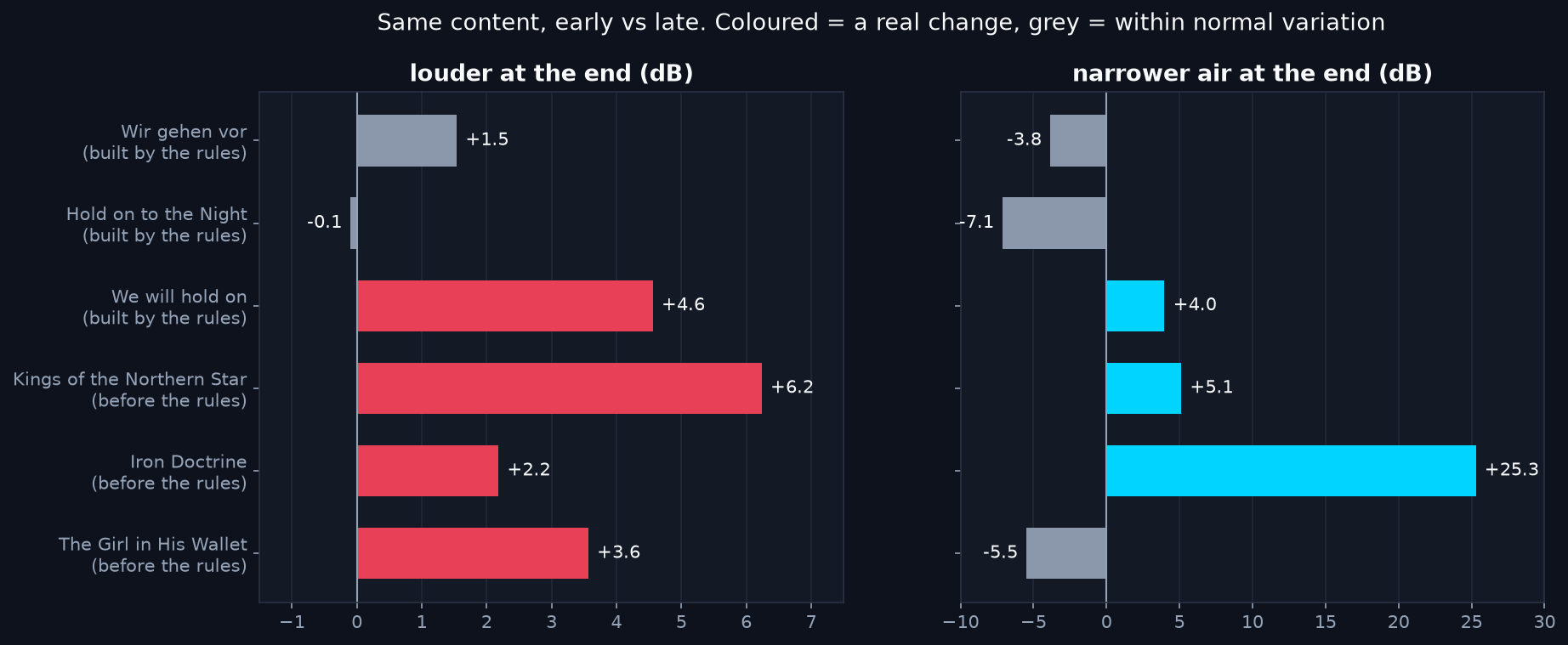
For the listening examples we made three more songs, on purpose against one rule: identical choruses, but a long, full ending instead of a short, narrow one. All three got louder toward the end, by 3.5 to 7 dB measured like with like, although every chorus cue asked for the same level. Two of them are in the players on this page.
Which is why there is a Part 2.
Part 2: When the take drifts anyway
Why this comes before mastering
Mastering treats a song as one piece. It sets one EQ, one compressor, one limiter and one loudness target for the whole track. A take that creeps up 4 to 6 dB breaks that. The limiter works hardest on the last chorus and flattens it. An EQ that suits the first minute is wrong for the last one. And the loudness target is set mostly by the loud ending, so the beginning comes out quieter than it should. Mastering cannot tell drift from arrangement, so it locks the drift in.
That is why the correction is a preparation step. Smart Preparation runs in Preparation, on the raw file, before anything else. It evens the song out, and only then does mastering get one song to work on, the same from the first chorus to the last.
Compare like with like
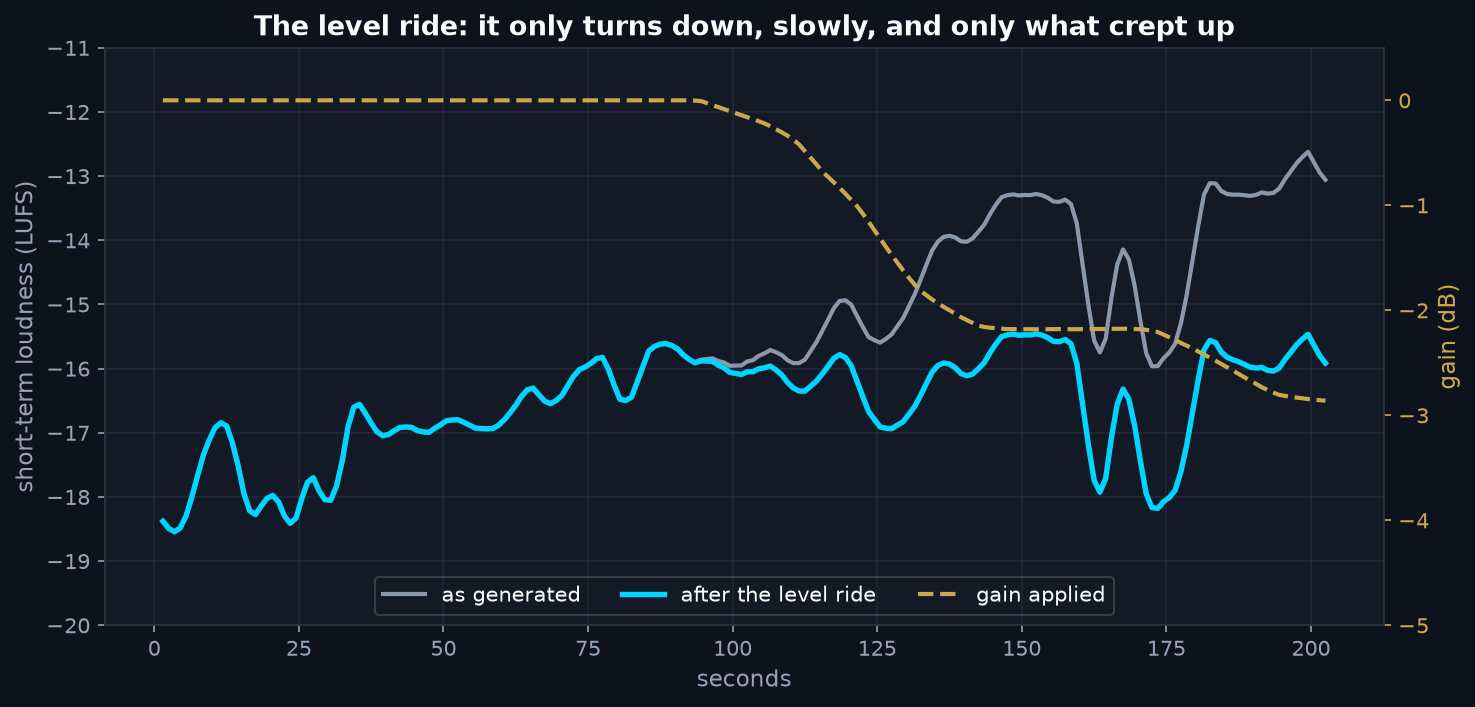
A song is supposed to change. The last chorus is often bigger than the first on purpose, so comparing the first minute with the last proves nothing. Smart Preparation compares only moments with the same content, the same chords and the same rhythm, and asks how their sound changes the further apart they are. A song that opens up by design is left alone. A song whose repeats get louder and narrower is not.
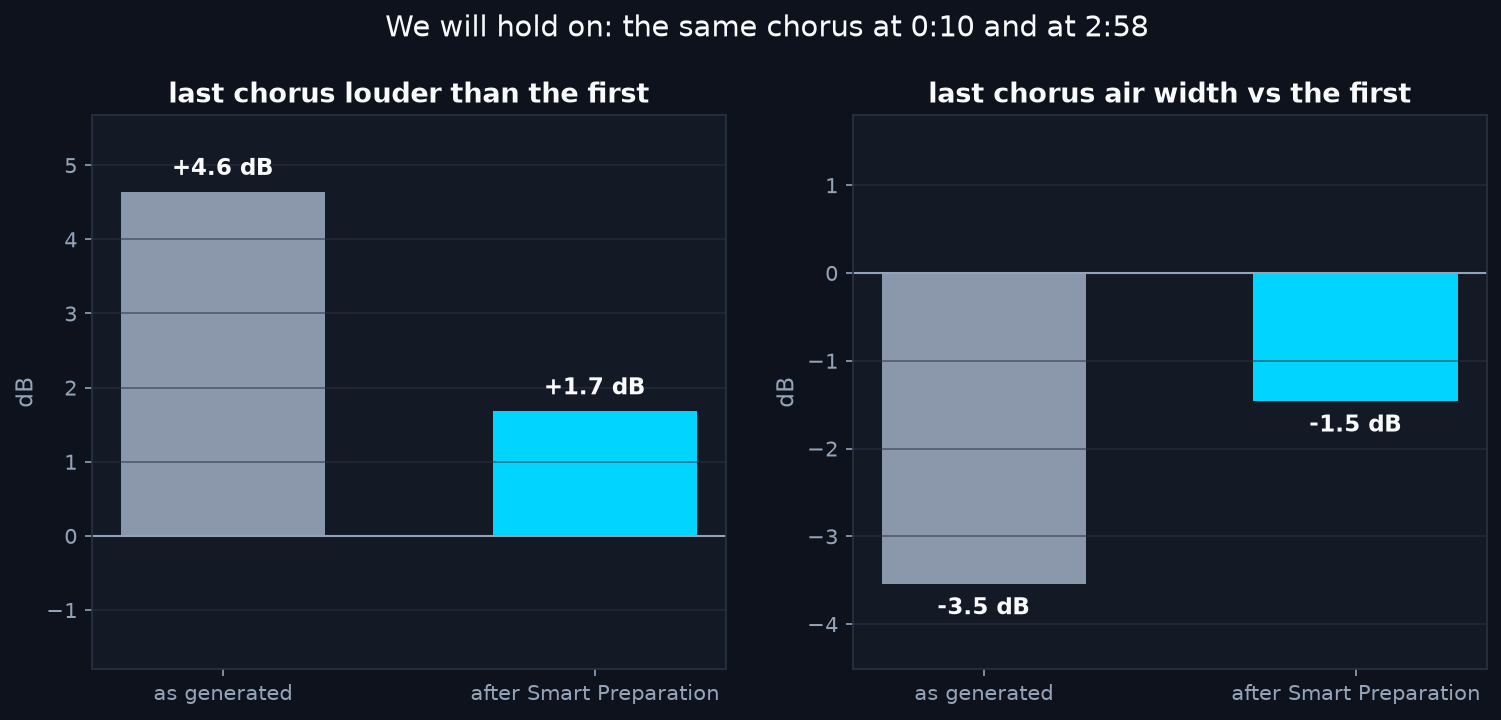
The end gets louder: a ride that only turns down
Tone and width, band by band
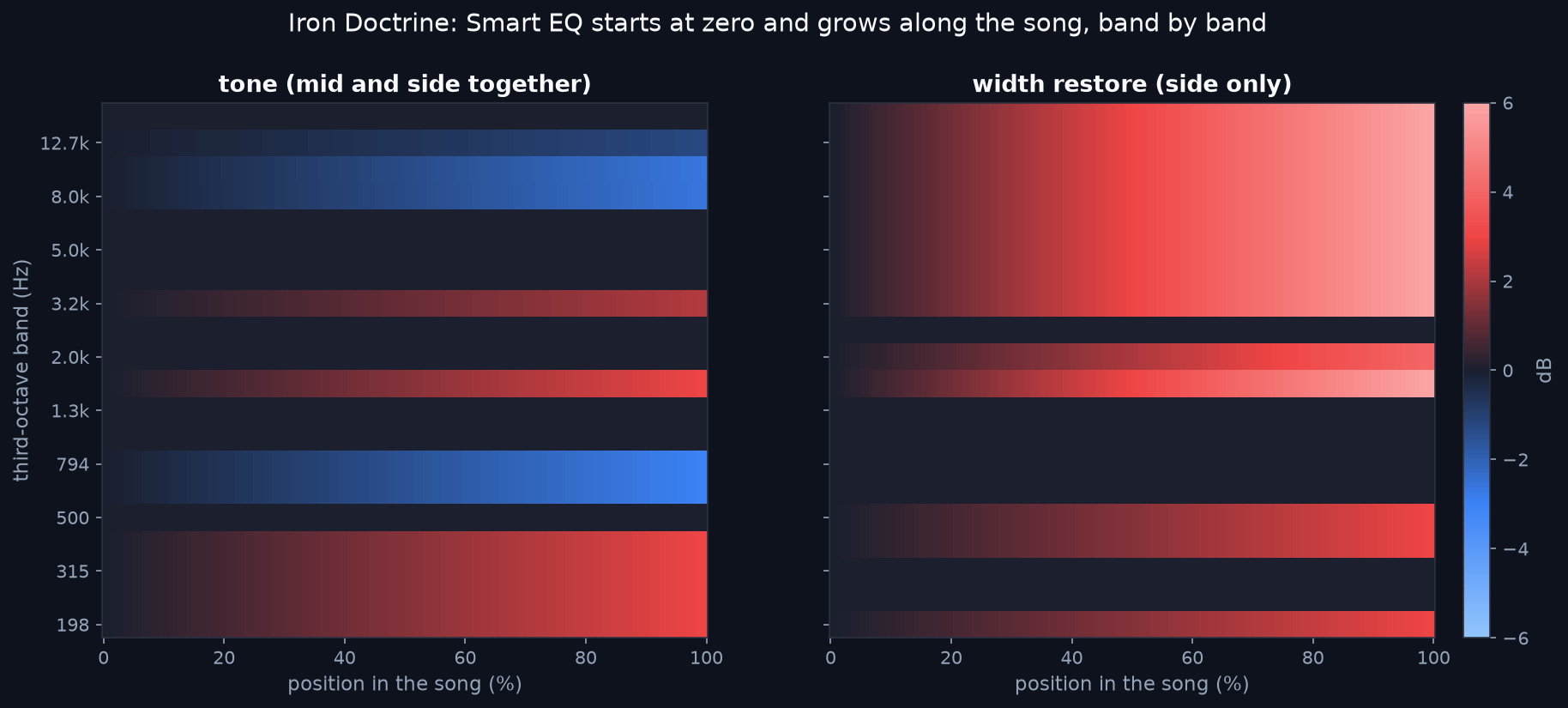
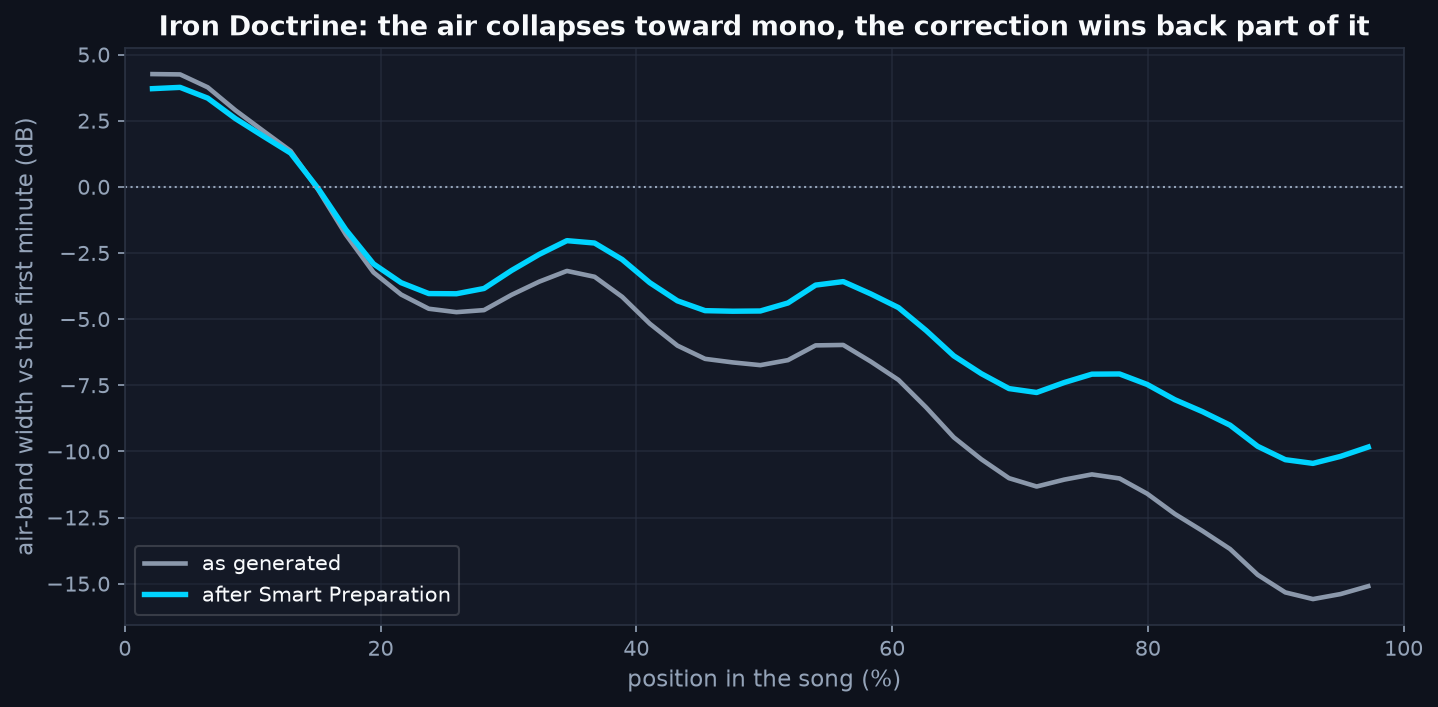
Three rules keep it honest. Width is only ever restored, never narrowed. Bass below 200 Hz stays mono. And the beginning of the song is the reference, so the first seconds are left as they are.
Listen: We will hold on
As generated, the final chorus is 2.4 dB louder than the same music at 1:45. Smart Preparation brings it back to the same level and opens the air a little. The kick drum that lost its thump stays as it is: that part is covered below.
One more: Spare Key
A milder case. As generated, the ending is 2.1 dB louder. Smart Preparation brings it back to within 0.4 dB: a smaller step than Same Old Song, in the same direction.
Fourteen songs, one listening each
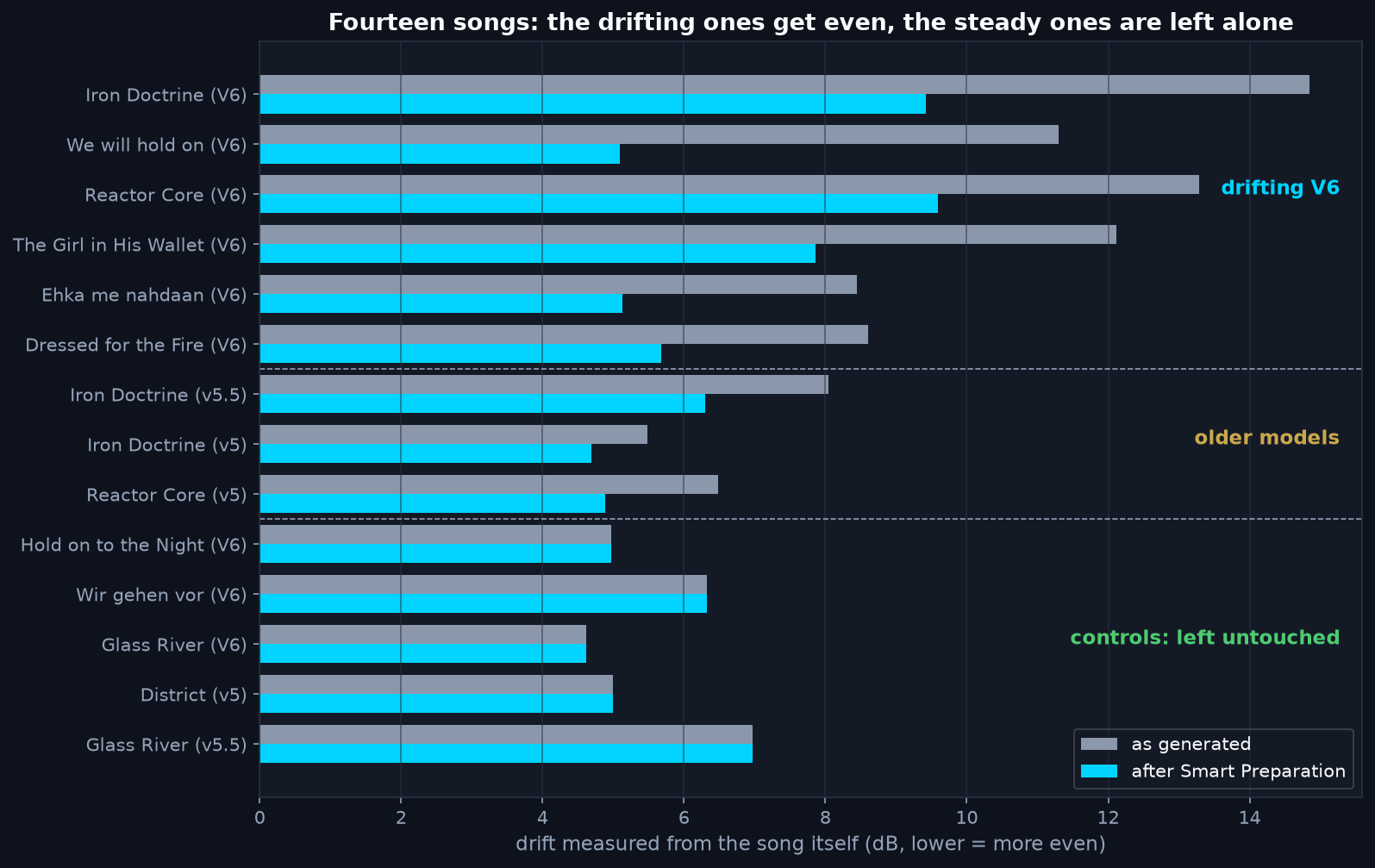
The listening verdict matched the numbers: it evens the track out in the right direction and never does too much. Where the generation itself was weak, the difference is hard to hear. That is the honest limit of any processing.
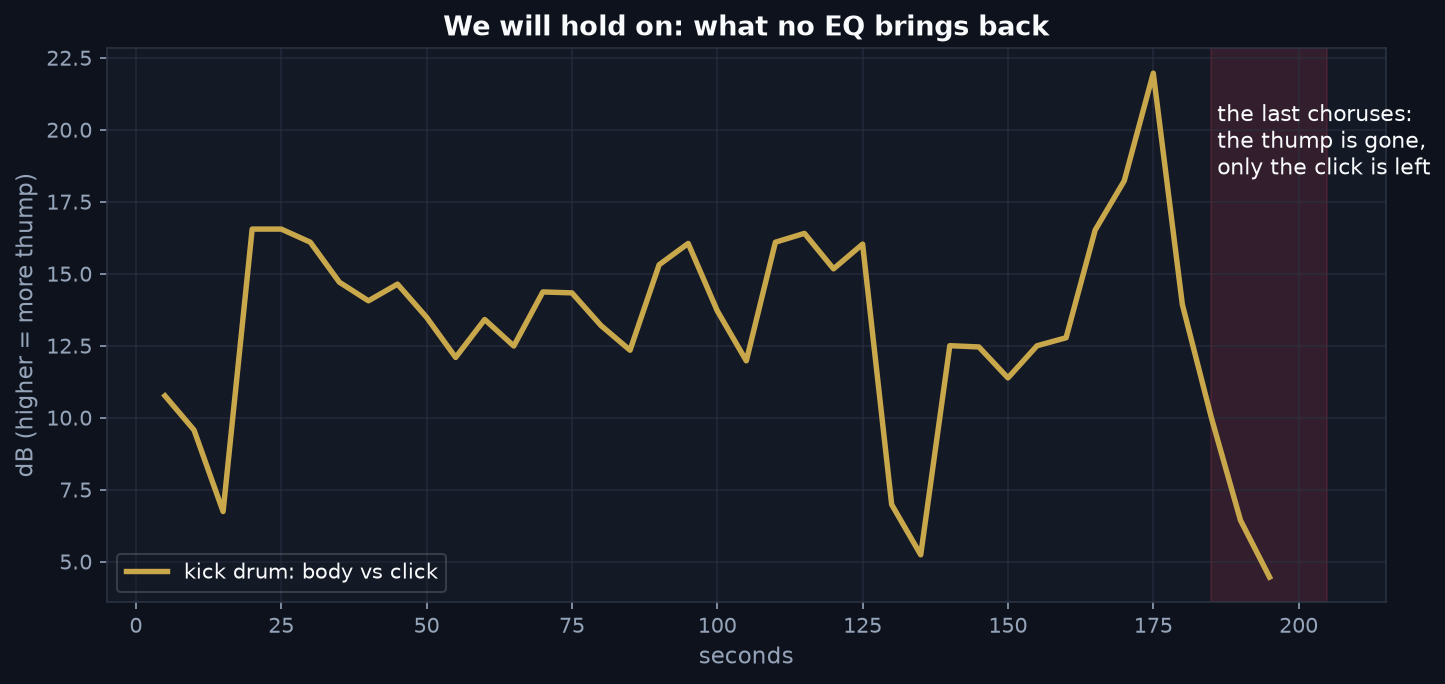
What no processing can bring back
- Words. On Iron Doctrine a speech model's confidence fell from 0.75 to 0.54 in the last minute. No EQ puts consonants back.
- A smeared kick drum. The model stopped drawing the thump. Turning up the low end only turns up the mud.
- Glitches. A wrong note or a broken syllable is the generation, not the sound.
For these, generate again, or replace the section. If your choruses are identical, paste the first chorus over the last in the Pro Master waveform editor.
The workflow, start to finish
- Build it by the rules in Part 1.
- Run Pro Analysis. Its diagnosis now includes a drift measurement: whether the end of your song has drifted from its beginning.
- Run Preparation. Smart Preparation evens out what drifted, automatically, at no extra cost. This is the step that makes the song ready to master.
- Then master it with Auto-Master or in Pro Master, on a song that is the same from the first chorus to the last.
- Still broken? Then it was the generation: take it again or replace the section.
Method and limits
Fourteen songs: six drifting V6 songs, three from older Suno models and five steady controls, three of them V6. Ten-second windows with a five-second hop. Content pairs come from the mid channel's chroma and onset rhythm, which do not change when a song gets louder or narrower. For each third-octave band, the change between paired moments is regressed on their distance in the song and tested with a 35-second block permutation and a false discovery rate of 10 percent. The level ride uses the first 35 percent of the song as its reference. Caps: tone 3 dB, width 6 dB (3 dB below 500 Hz), nothing below 180 Hz.
The limits are real. One listener, one take per song, and fourteen songs are enough for the direction of the effect, not for every genre. The production version of Smart Preparation was checked to reproduce the approved research result to within the 24-bit noise floor. Same Old Song and Spare Key were made after the fourteen-song test and run through that production version, one take each; the players use the pair of moments where the measured difference is clearest.
Even out your V6 track
Step 1. Run Pro Analysis to see whether your song drifts, and how much.
Step 2. Run Preparation. Smart Preparation is built in and runs only where it measures drift.
Step 3. Master the prepared song in Pro Master, or let Auto-Master run Preparation and mastering in one go.
What V6 renders well. We are testing whether inspo and cover tracks keep a V6 song from drifting in the first place.