That Nasty Noise in the Song
Is Gone
Some AI tracks are tiring to listen to and you cannot quite say why. Not too loud, not distorted, nothing obvious on the meters. But after a minute your ears want a break, and it gets worse on headphones, in the car, or on a real system.
The reason is usually one small, specific defect baked into the audio by the generator: a bubble of noise sitting in the stereo sides, or a thin metallic ring threaded through the mids. Most casual listeners never consciously hear it. It just makes the track feel cheap and fatiguing. If you are the kind of producer who notices, you are exactly who this is for.
Surgical Cleanup is the Pro Master tool that finds that defect and takes it out, in the browser, without a DAW. It is the frequency-domain companion to Surgical Repair, which removes codec clicks at the sample level. A click is a problem in time. This is a problem in frequency, and it is solved a different way.
Find it, then kill it
Surgical Cleanup gives you a narrow band and a few things to do with it, and the workflow is the whole point.
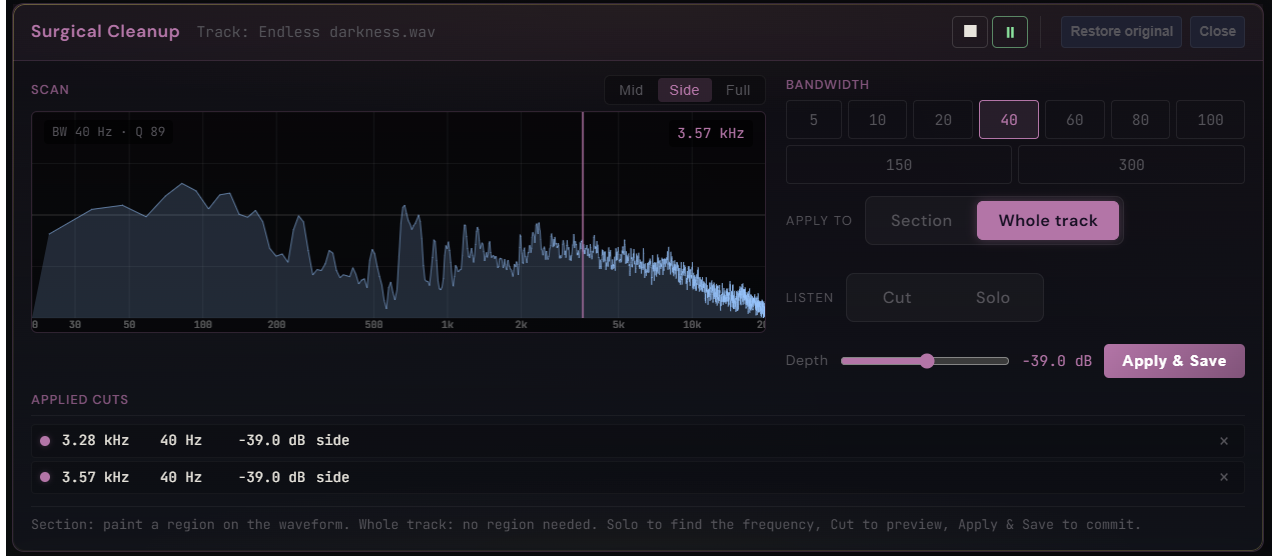
Pick a channel: Mid, Side, or Full. Most AI defects hide in the side, which is the stereo difference signal, or in a narrow resonance somewhere in the mid. Set a bandwidth, anywhere from 5 to 300 Hz. Then sweep the frequency and hit Solo to hear only that band, so you can hunt the offending tone by ear instead of guessing. Hit Cut to preview the track with it removed. Set the Depth, up to −80 dB which is effectively silent once the music returns around it. Apply it to a painted Section or to the Whole track, and every cut lands in the Applied Cuts list so you can stack several.
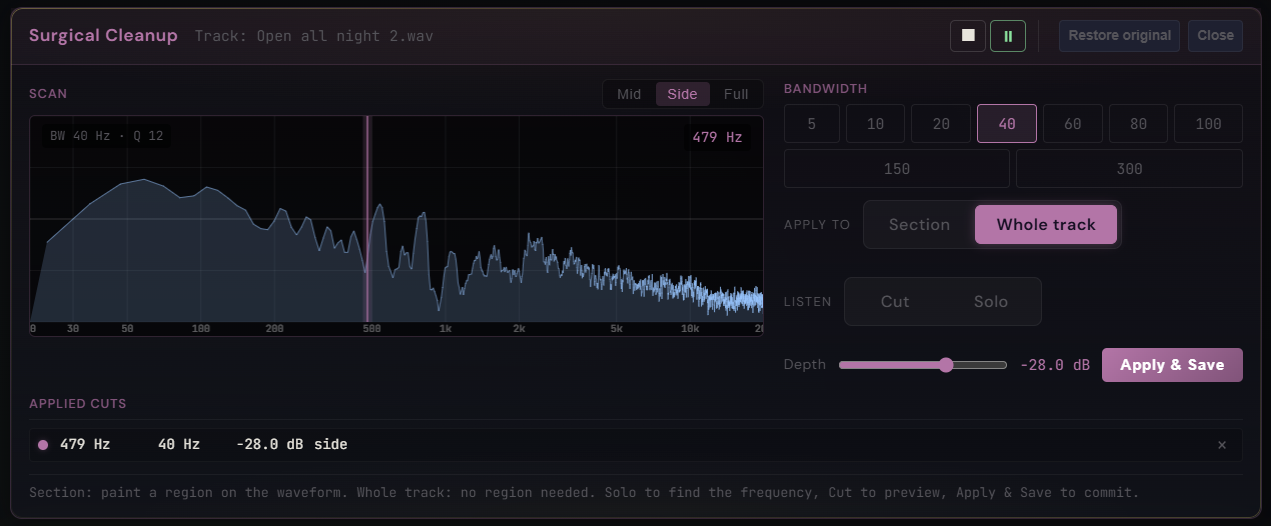
No audio engineering vocabulary required. You sweep, you solo, you listen, you cut. Here is what that does to two real tracks.
Open all night: the bubble in the sides
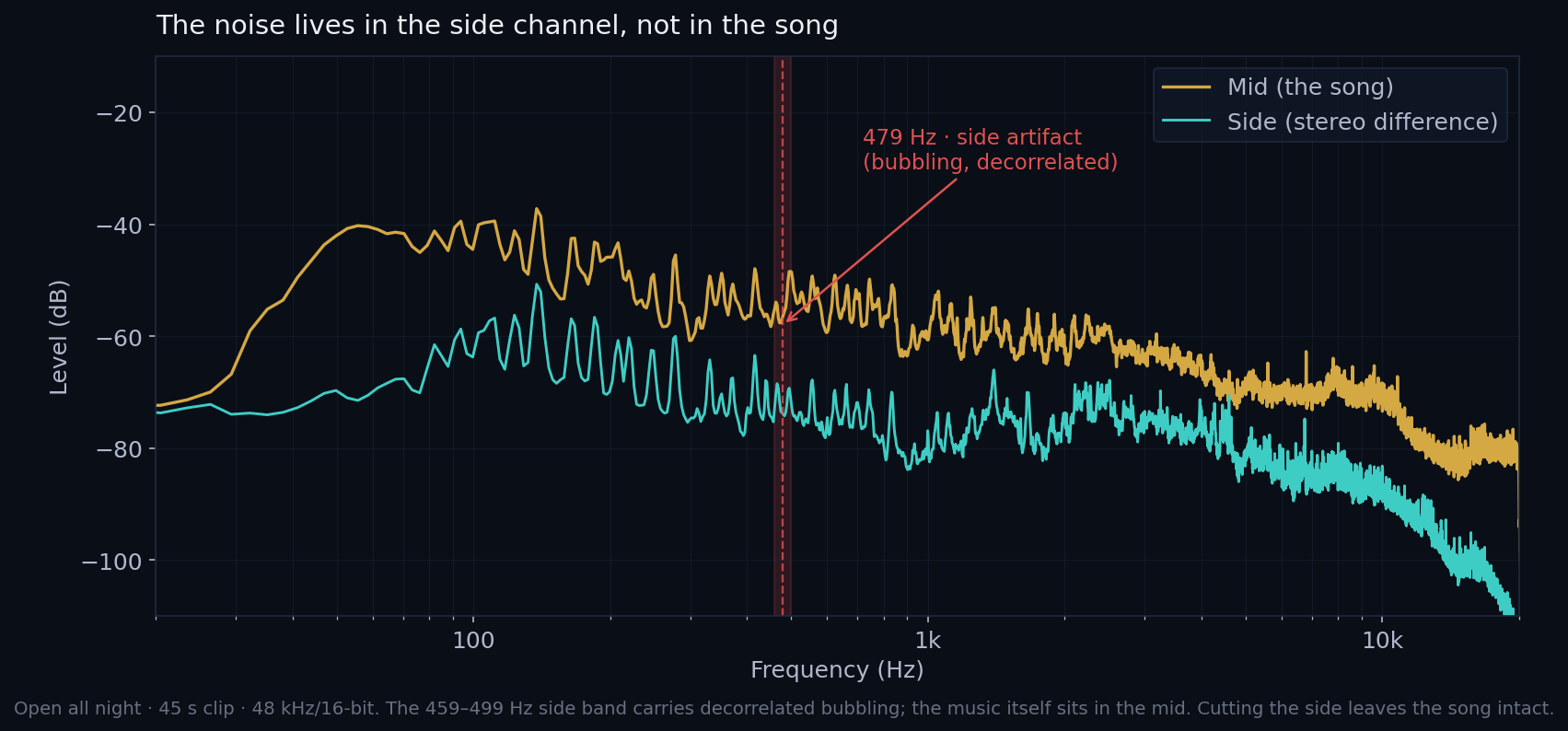
This track is tiring on headphones and it is hard to point at why. Here is the culprit, soloed out of the mix and boosted so you cannot miss it: a restless bubbling that has nothing to do with the music.
That is a decorrelated bubble around 479 Hz that lives only in the side channel. It is not a steady tone. The isolated band swells and collapses by almost 43 dB in bursts, and that bursting is the bubbling you just heard. Because it sits in the side and not the centre, it is spatially exposed on headphones, while the actual song sits safely in the mid.
Now play the whole track both ways. On a laptop speaker the difference is not dramatic. On headphones the cleaned version is calmer, with less of that restless haze sitting behind the music, now that you know what to listen for.
The fix is one cut: 479 Hz, 40 Hz wide, on the side channel. The cut is local. The band drops, the music 130 Hz away on either side barely moves, and the mid is untouched by definition, because we never filter it.
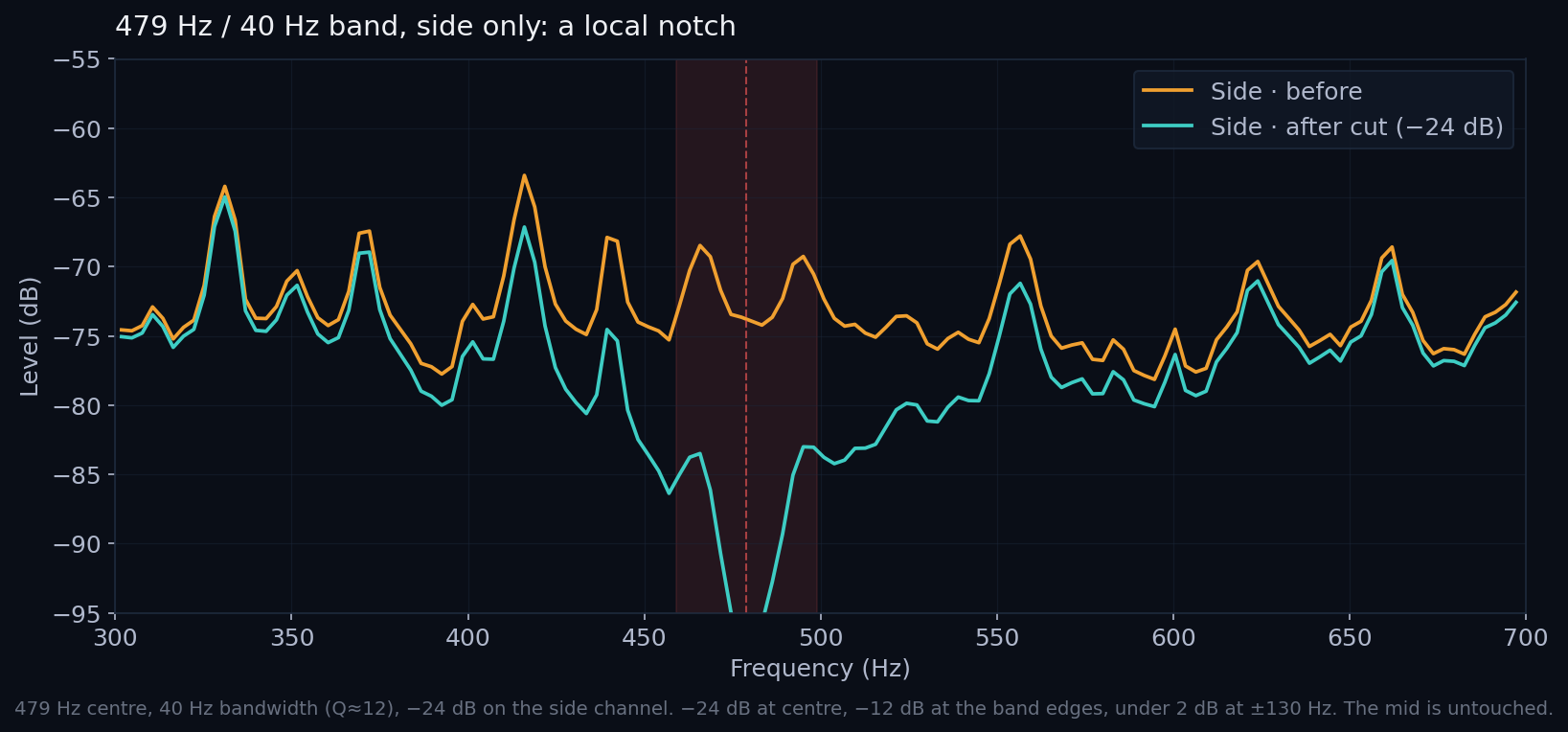
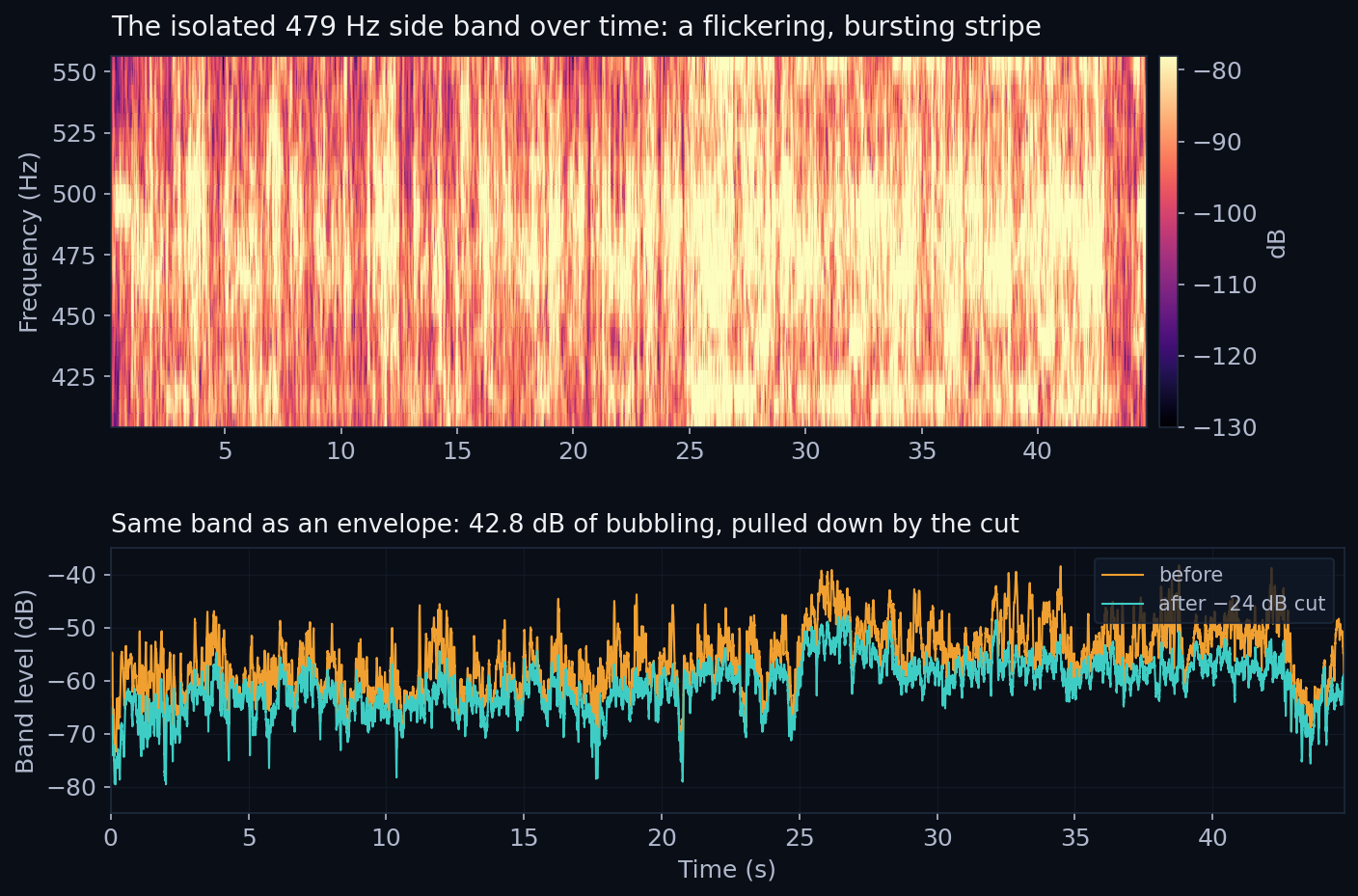
This is the kind of defect that does not show up as a number you would flag, but it is exactly what fatigues your ears over a few minutes, and it gets louder the better your playback gets: headphones, a car, a real stereo. Cleaning the side here removes the haze without narrowing anything you want to keep.
Endless Darkness: a metallic ring that does not belong
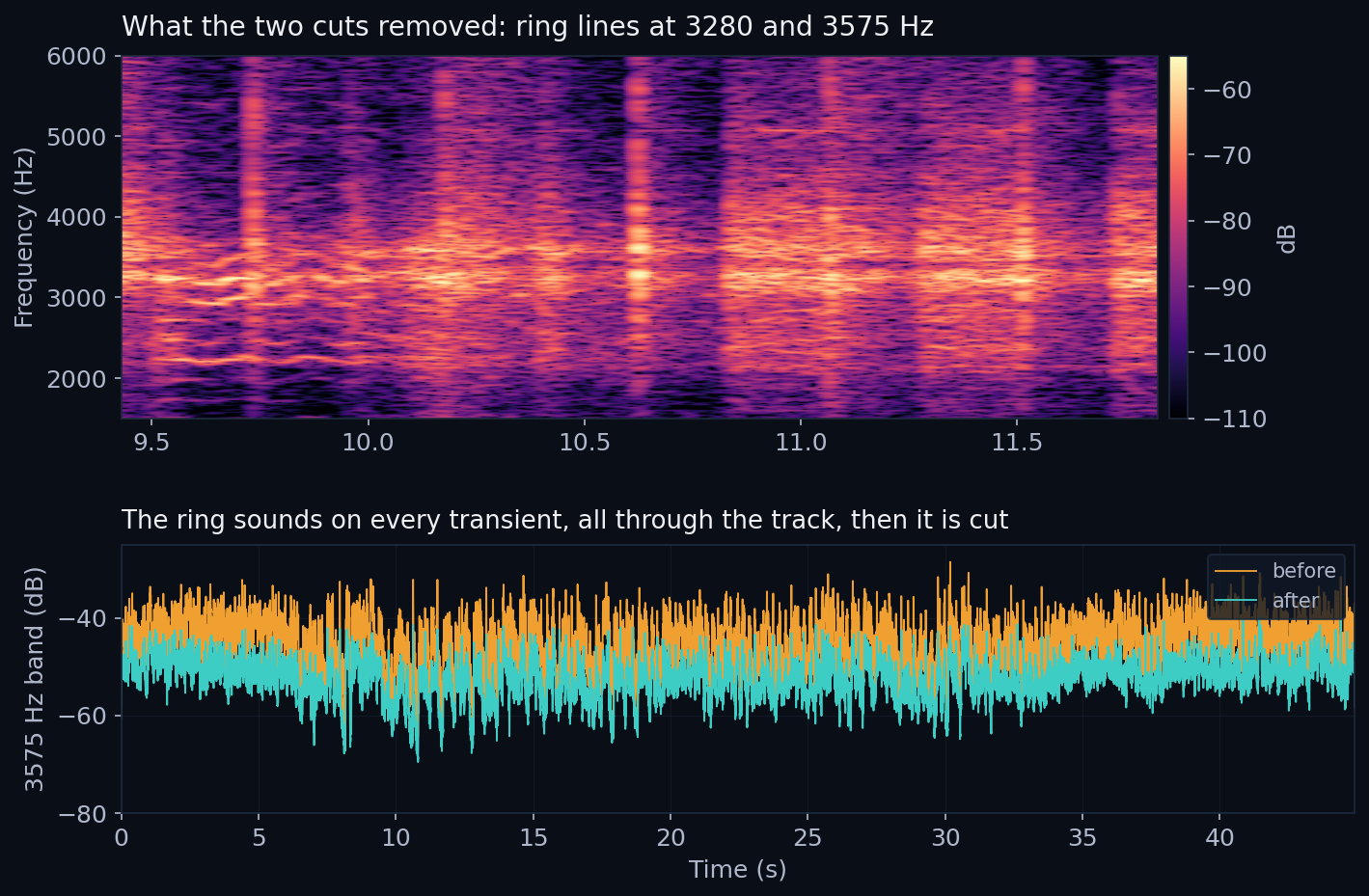
This one is easier to hear. There is a thin metallic ring threaded through the track, a kind of piping whine that flares a few seconds in and hums under everything else. Here it is pulled out of the mix on its own.
This is the raw resonance, soloed and boosted so it is unmistakable. It is harsh and deliberately loud. Turn your volume down before you press play.
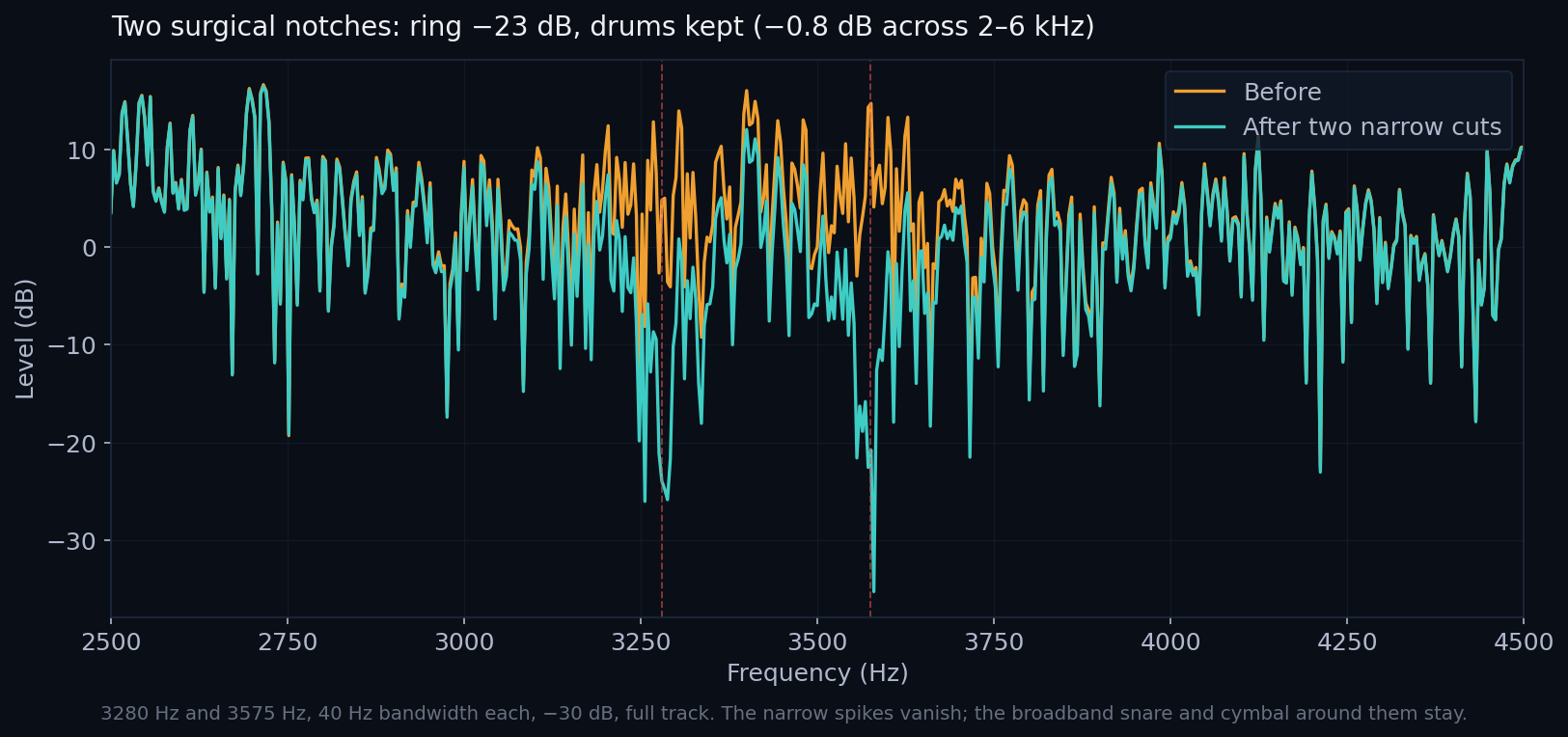
What it is: a high-Q resonance at 3575 Hz with inharmonic partials at 2825 and 3280 Hz, which is the signature of a metallic timbre. Every drum transient excites it, so it rings continuously in the background rather than once. And it sits roughly in the centre, in the same 3 to 4 kHz region as the snare and cymbal presence.
Now hear the whole track both ways. When that whine goes, the track does not just lose something. It gains depth. The space the ring was smearing opens back up, and the mix sounds further back and more three-dimensional than before.
That centre placement is exactly why it has been hard to remove. A wide cut there would dull the whole drum kit. But the ring is narrow and the drums are broadband, so the answer is two narrow notches, at 3280 and 3575 Hz. They take the ring down by 23 dB while the snare and cymbal around them lose under 1 dB. Two entries in the Applied Cuts list, half a minute of work.
An honest note
Two things to be straight about. First, this needs a good ear and decent monitoring. On a phone speaker most of these fixes are inaudible. They reveal themselves on headphones, in a car, on a real system, which is precisely where listening fatigue builds up.
Second, a single cut trades depth for width. A shallow narrow cut stays surgical, but pushing one cut all the way to −80 dB widens its skirts and starts thinning a broad region rather than a sliver. For a deep but narrow removal, stack a couple of moderate cuts at the same spot instead of forcing one to the floor. And nothing here fixes a cluttered arrangement: if five instruments are fighting over the same midrange, the fix is in the prompt, not in post.
Who this is for
Surgical Cleanup was built for producers who make AI music and want it to sound finished, but who never spent years learning a DAW. You do not need to know what a parametric notch is, or which channel is the side. You sweep, you solo, you listen, you cut. The tool does the math, in the browser, and your audio never leaves your device.
Hear it on your own track
Step 1. Drop any AI track into the MasterForge Audio Analyzer for a free health score and a full artifact breakdown. No account needed.
Step 2. Open it in Pro Master, find Surgical Cleanup, and take out the noise that has been wearing your ears down. No DAW, nothing to install, and your audio never leaves your device.
Surgical Cleanup is one tool in Pro Master. The rest of the kit lives in the feature gallery: a visual compressor, reference matching, surgical click repair, batch processing and more, all running free in the browser with nothing to learn but the play button.
If you would rather not touch a single control, our hand-finished mastering service takes your track and returns a release-ready master with the defects removed and the loudness dialled in, finished by a person, not a preset. You get the polished result without learning the tools.