Surgical Repair of
Suno Artifacts
572 clicks. One channel. Repaired by hand.
The Click You Cannot Prompt Away
A producer sent us a Suno track last week and asked why the vocals had a faint, recurring snap that would not go away. Not a distortion. Not a plosive. Something harder and more metallic, appearing at the start of almost every syllable. In Finnish we would call it räsähdys: a sharp crack, the sound of a limiter being overshot, but with a different character.
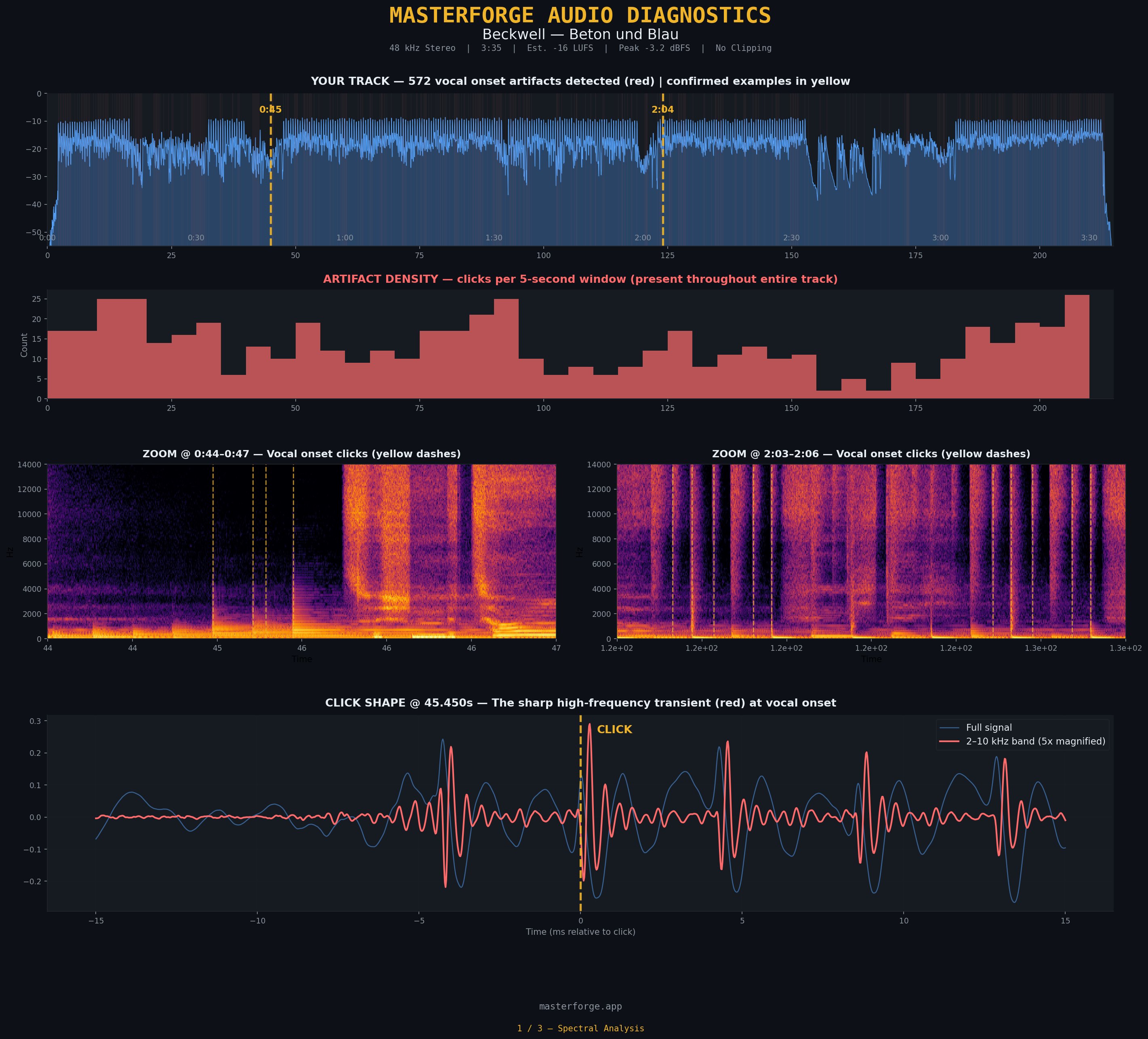
We ran a full spectral analysis on the track. The file was Beckwell: Beton und Blau, a German-language melodic pop-dance ballad. The track is by an external artist and is used here as a case study with permission. The artifact was not engineered on purpose. It was a real, unprompted generation. The analyzer returned a number that made the problem concrete:
Even more telling: almost every click landed in only one channel. Left or right, rarely both. The codec had concentrated the full burst of reconstruction energy into a single side of the stereo field, as if jamming a spike into one ear. That is why the clicks sound so jarring through headphones. Stereo hearing is extremely sensitive to sudden unilateral events.
This is not a bad track. It has no clipping, reasonable loudness (−16 LUFS), clean peak headroom. By most metrics it is a successful generation. But under the surface it has 572 structural defects that no conventional mastering tool can touch. Here is what we found, why it matters, and how we repaired it.
What a Sub-Frame Artifact Actually Is
Suno's neural codec reconstructs audio in short frames of roughly 23 milliseconds. Inside each frame the codec predicts what the signal should look like based on training data. For a steady tone this works beautifully. For a sudden transient, say the hard consonant at the start of a German word, the codec has to jump from low energy to high energy within a single frame. It overshoots.
That overshoot appears in the waveform as a sharp spike, 5 to 50 times louder than the surrounding signal, concentrated in the 2–10 kHz band. It lasts between 0.5 and 3 milliseconds. Your ear registers it as a click, but it is not a mouth sound. It is a reconstruction error baked into the audio data.
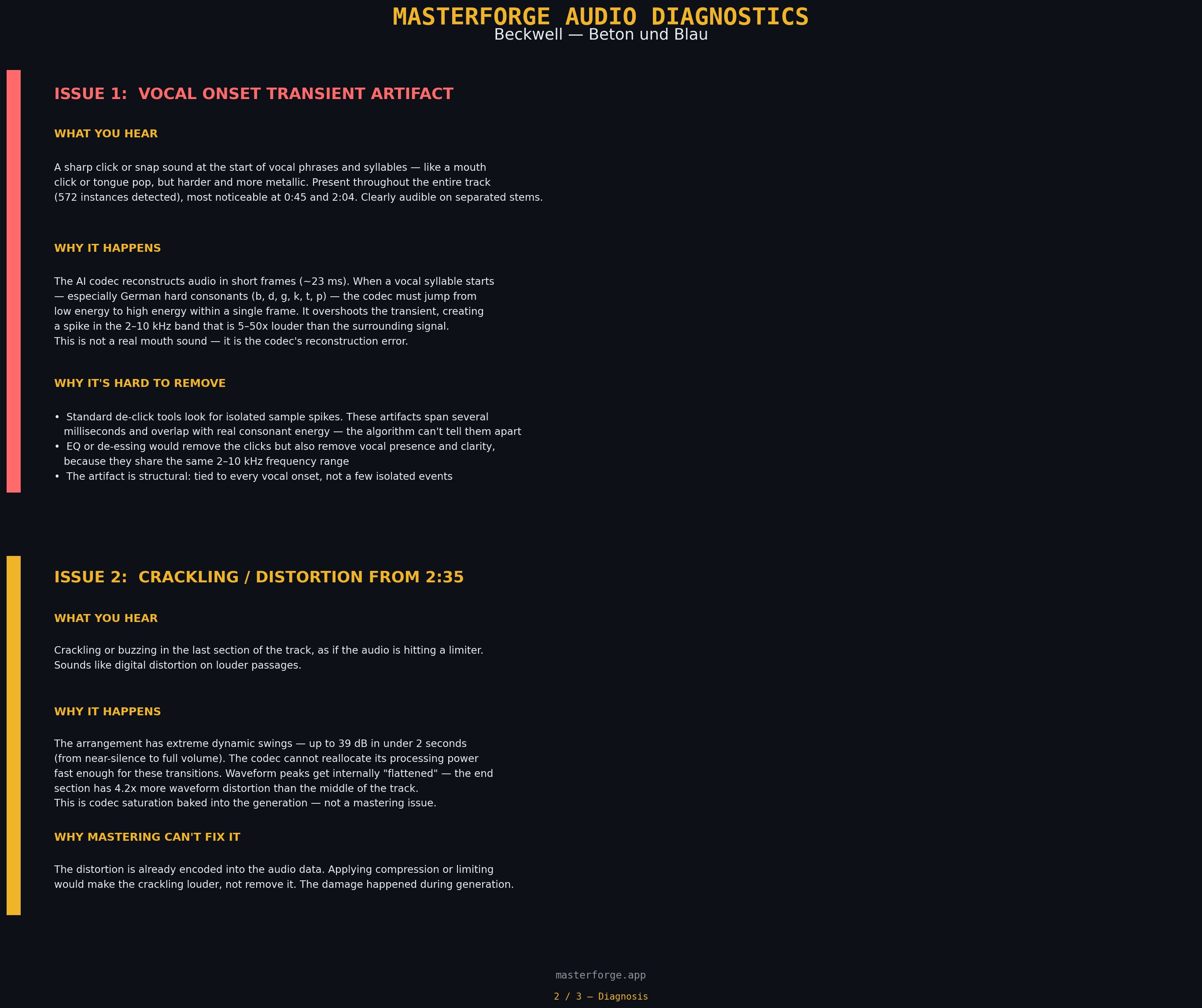
A de-clicker looks for isolated sample spikes. These artifacts span several milliseconds and overlap with real consonant energy in the same frequency band. A de-esser or EQ cut would remove the click, but also strip the vocal presence. The artifact is structural: tied to every vocal onset, not a few isolated events.
The STFT Floor (Almost Good Enough)
Our first attempt to solve this was on the spectral side. We have been building a separate preprocessing tool called SpectralForge (currently in private beta) that operates on the mel spectrogram rather than the raw waveform. It does a lot of things well: stem separation, harmonic-percussive splitting, mel-domain cleanup, transient shaping, and click repair.
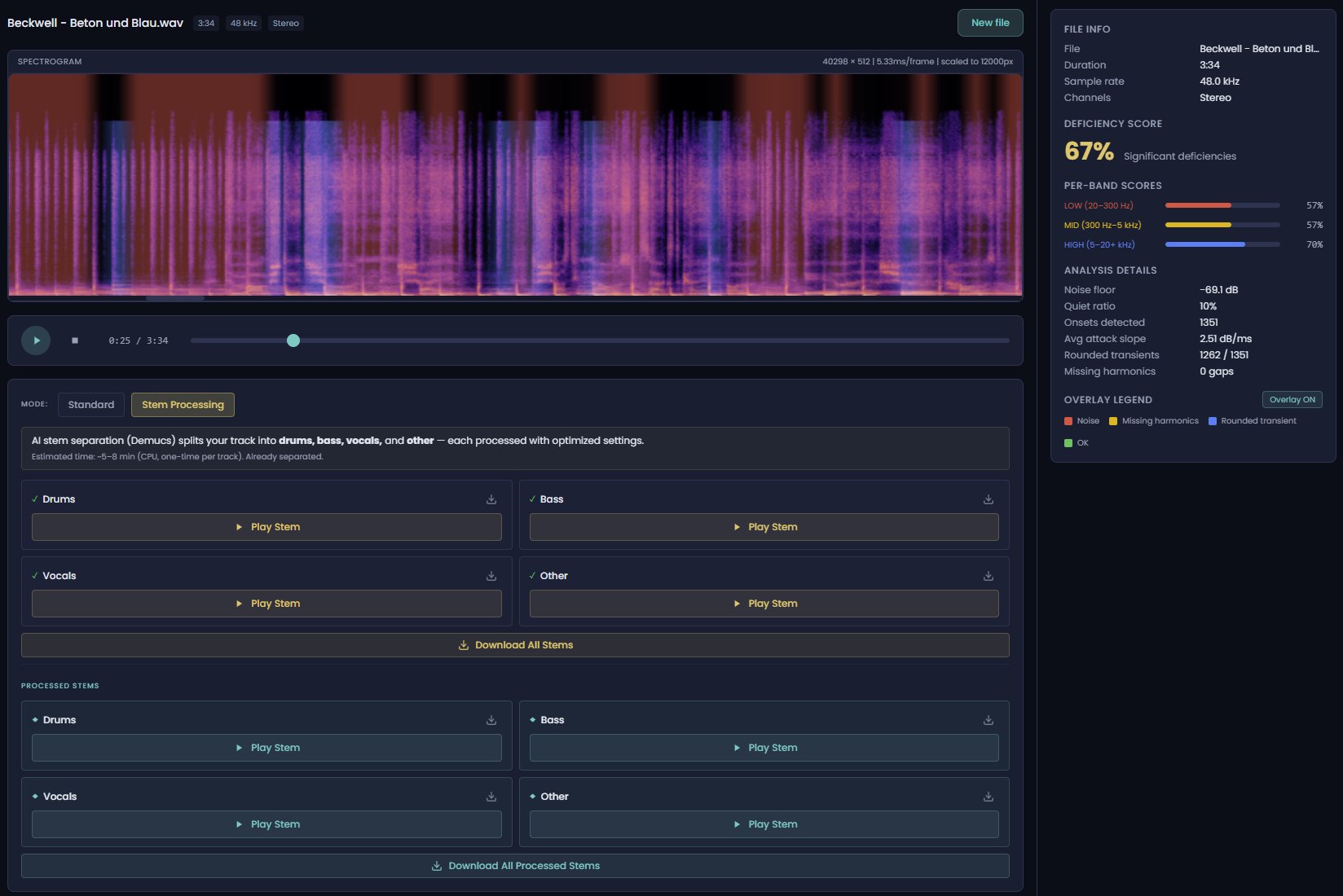
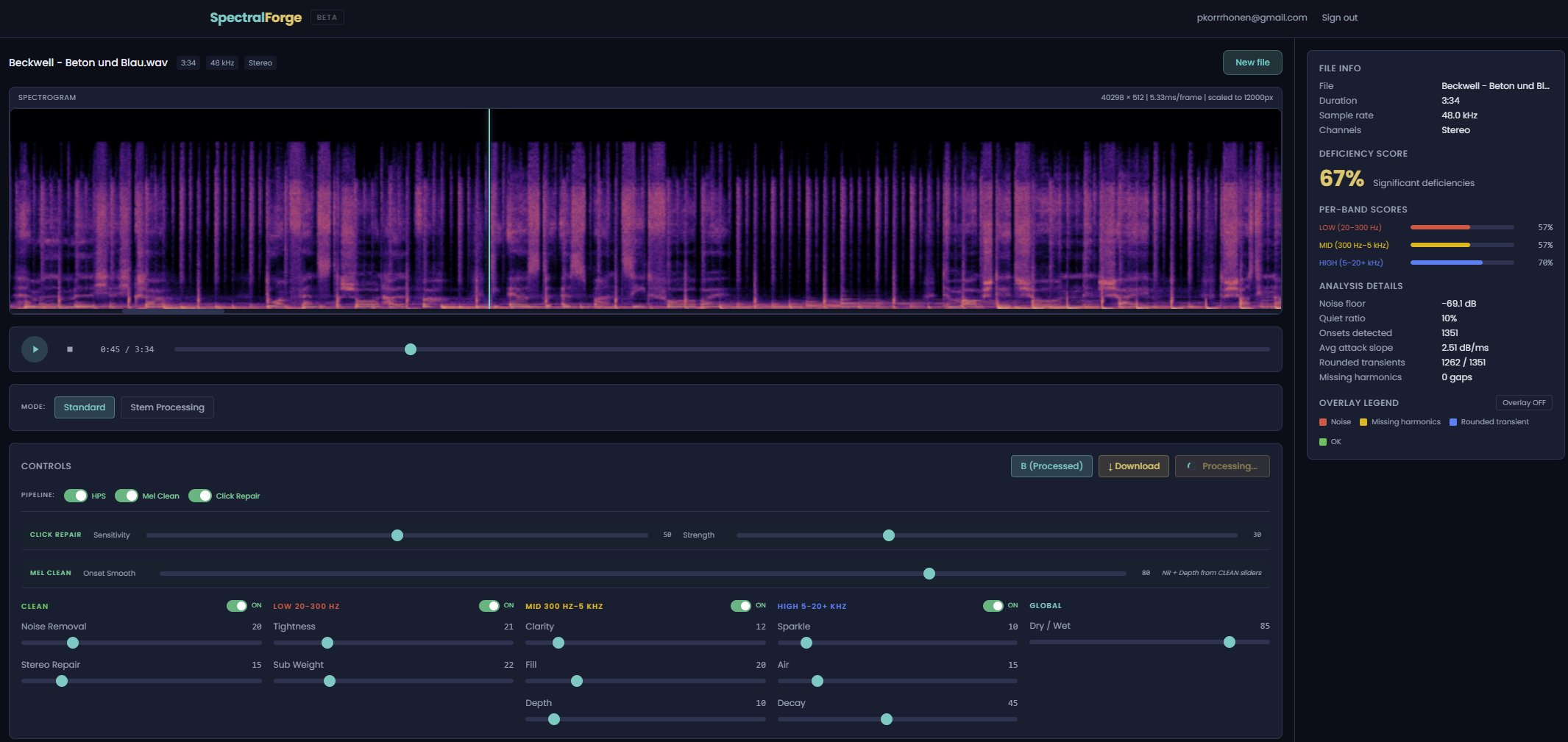
SpectralForge reduces click severity noticeably. But it hits a hard wall: the STFT frame we work with has a minimum hop of around 5 milliseconds. The clicks we are chasing are shorter than that. We can soften their character with a transient limiter, we can rebalance the surrounding spectrum, but we cannot surgically remove a 0.8 ms event with a 5 ms tool. The math does not allow it.
This is the floor that every STFT-based repair tool hits. It is why generic de-click plugins, even good ones, only partially help with Suno material. To actually remove a sub-frame artifact, you have to work on the waveform itself, at the sample level.
What SpectralForge does bring back
The click problem is the dramatic failure mode, but it is not the only one. There is a quieter issue that affects almost every AI-generated track: transient rounding. The Suno codec does not only overshoot hard onsets, it also flattens gentle ones. Drum hits that should crack sound softer. Pick attacks on guitars lose their edge. Piano hammers lose definition. The output has an audible blur on fast dynamics, even when nothing sounds obviously wrong.
SpectralForge's transient shaper is designed for exactly this. In the tracks where we have tested it, instrument sharpness increases measurably, and the overall perception of "AI-ness" decreases. Preprocessing through SpectralForge before mastering has become a routine step in our own workflow. It improves audio quality in a way that mastering alone cannot.
Nothing we know of saves a cluttered five-instrument Suno mix where every voice occupies the same midrange. Not stem separation, not spectral repair, not mastering. At that density the instruments have been rendered on top of each other in the latent space and cannot be untangled without adding new audio. If your arrangement is the problem, the fix is in the prompt, not in post-processing.
Pro Master's Waveform Editor
That is exactly what we built. The new waveform editor in Pro Master lets you zoom down to the sample level, select a region by dragging, and adjust its gain with the scroll wheel in 0.5 dB steps. Edits are applied directly to the audio buffer and you hear them immediately on playback. Undo is unlimited. An A/B toggle compares edited against original. A preview button loops just the selection.
Everything runs in the browser. No plugin, no download, no upload to a server. You open the track in Pro Master, click the pencil icon, and you are editing.
Finding a click
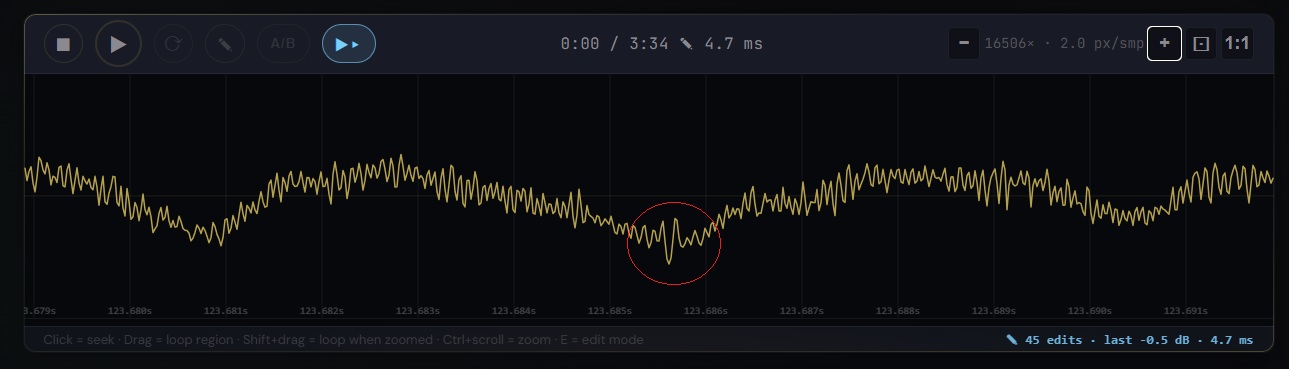
At 16506x zoom the waveform becomes a continuous curve. A codec click looks unmistakable: a sudden, out-of-phase swing against the ambient oscillation, circled below in red. The surrounding signal is smooth. The spike is foreign.
Sample-level inspection
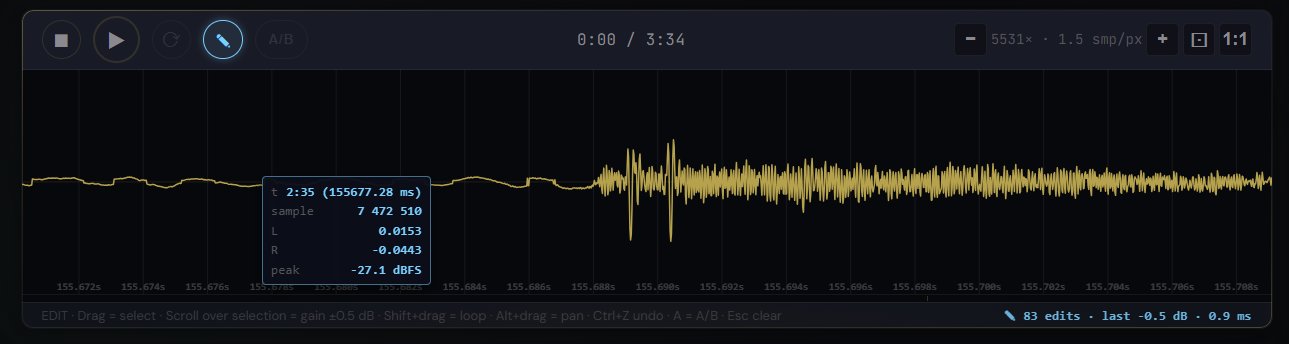
Hovering over any sample shows its exact time, sample number, L/R amplitude, and peak dBFS. Useful for confirming you are looking at an artifact and not a legitimate transient.
Editing
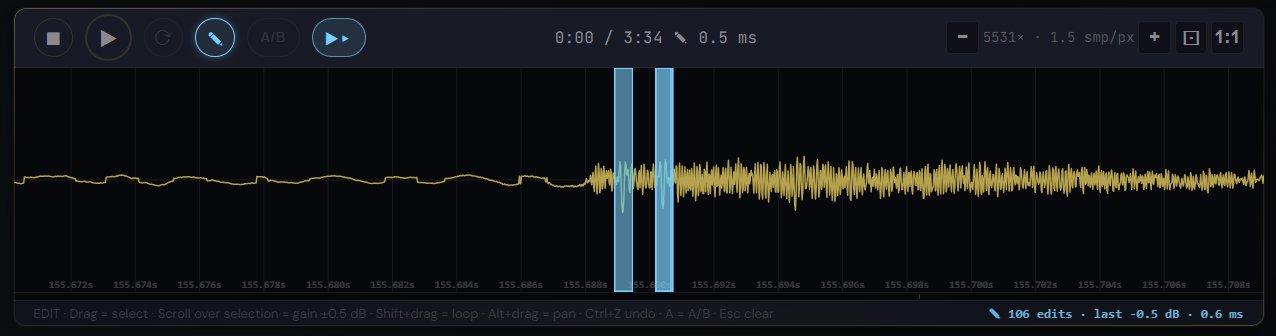
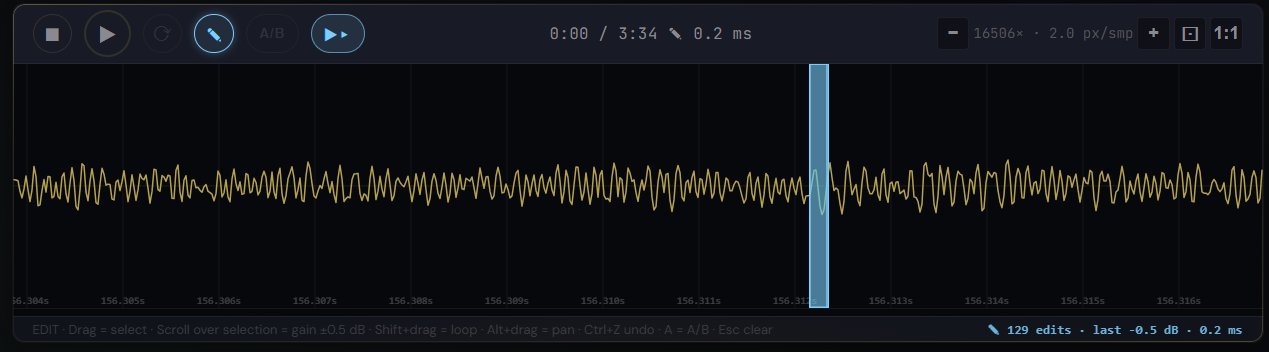
Select the spike by dragging. Scroll down. Each tick is −0.5 dB applied to the selection only. Two or three ticks is usually enough to pull the click below the surrounding consonant energy. The click is gone. The consonant is still there.
Fast or precise, your choice
There are two legitimate ways to use this workflow. You can be surgical: zoom all the way in, identify each individual spike, select it tightly, attenuate it by exactly as much as it needs. That is how you get a clinically clean result. It takes longer.
Or you can be efficient: zoom out a little, select a wider region that contains several clicks at once, pull the whole region down by 1 or 2 dB. The human ear is forgiving of brief attenuation on a consonant cluster; it is not forgiving of a click. A less precise edit applied to a slightly longer region will remove the click and the listener will not hear the attenuation. This is especially true when the edits are only 2–5 ms long. You might process a whole track in ten minutes instead of thirty, with almost the same perceived result.
The tool does not force you into one approach. You decide how much time is worth spending.
336 Edits, 20 Minutes
The full fix on Beton und Blau required 336 edits across 3 minutes 35 seconds of audio. Each edit averaged 1 to 2 milliseconds in length with a gain reduction of 1 to 3 dB. Total working time: roughly 20 minutes, once the rhythm of zoom-select-scroll becomes familiar.

Why this number is not as intimidating as it sounds: the artifacts are predictable. They land on vocal onsets, every time. Once you have fixed the first 10 or 20, you know what you are looking for. Zoom, drag, scroll. Zoom, drag, scroll. It becomes a visual rhythm.
No audio engineering degree is required for this workflow. Anyone who can operate a mouse wheel and hear the difference between a click and a clean consonant can do it. The tool does the hard part: sub-sample peak caching, lossless buffer edits, A/B toggle, unlimited undo. You do the listening.
Preprocessing vs. Surgery
The two approaches solve different parts of the same problem, and they compose well.
SpectralForge (Beta)
What it does: Pre-clean the whole track at the spectral level. HPS decomposition, mel-domain cleanup, transient limiting, click repair across the full mix or per stem.
When to use: As a preprocessing pass before mastering. Reduces click severity globally, lowers the amount of manual work needed downstream.
Time: 2–5 minutes automated.
Pro Master Waveform
What it does: Sample-level manual attenuation of individual artifacts that survive preprocessing. True surgical repair.
When to use: On tracks where preprocessing gets you most of the way but audible clicks remain. Final polish on the handful of artifacts that matter.
Time: 10–30 minutes depending on track density.
On Beton und Blau we used both. SpectralForge brought the 572 detected artifacts down to roughly 400 audible ones. Pro Master's waveform editor fixed the 336 that still crossed the threshold after preprocessing. The rest were below audibility and left alone.
The Point
Codec clicks are a structural feature of neural audio generation, not a flaw in anyone's prompt. They do not respond to prompt engineering, they do not respond to re-rolls, and until recently they did not respond to any browser-based tool either. The claim we want to make here is simple:
Sub-frame artifacts can now be repaired, by anyone, without a DAW or plugin subscription, in ten to thirty minutes of careful scrolling.
That is what Pro Master's waveform editor is for. It is not a replacement for MasterForge Starter. It is a dedicated tool for the small but real group of producers who want their AI tracks to sound finished at the sample level, and who are willing to put in the time to get there.
What Else Pro Master Does
While we are on the subject: the waveform editor is one piece of a larger browser-based mastering tool that was built primarily with AI music producers in mind, though nothing in it is AI-specific. It works on any audio.
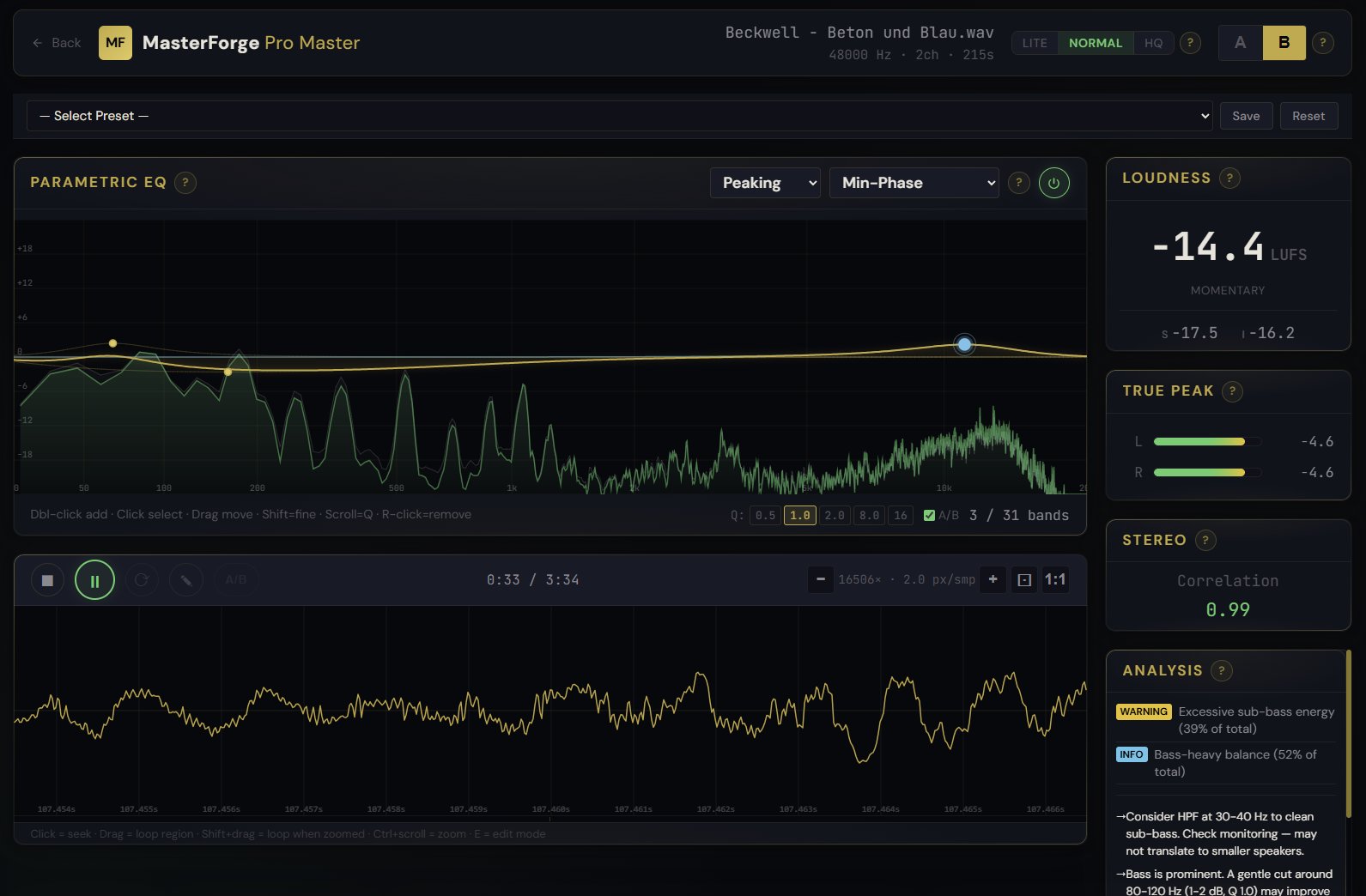
31-band parametric EQ with real-time analysis
A full parametric EQ sitting on top of a live FFT of the track. Peaking, shelving, and bandpass node types. Min-phase or linear-phase rendering. Q values, A/B toggle, double-click to add, right-click to remove. The analysis panel on the right runs simultaneously: integrated and momentary LUFS, true peak per channel, stereo correlation, plus a prose commentary on the track's spectral balance.
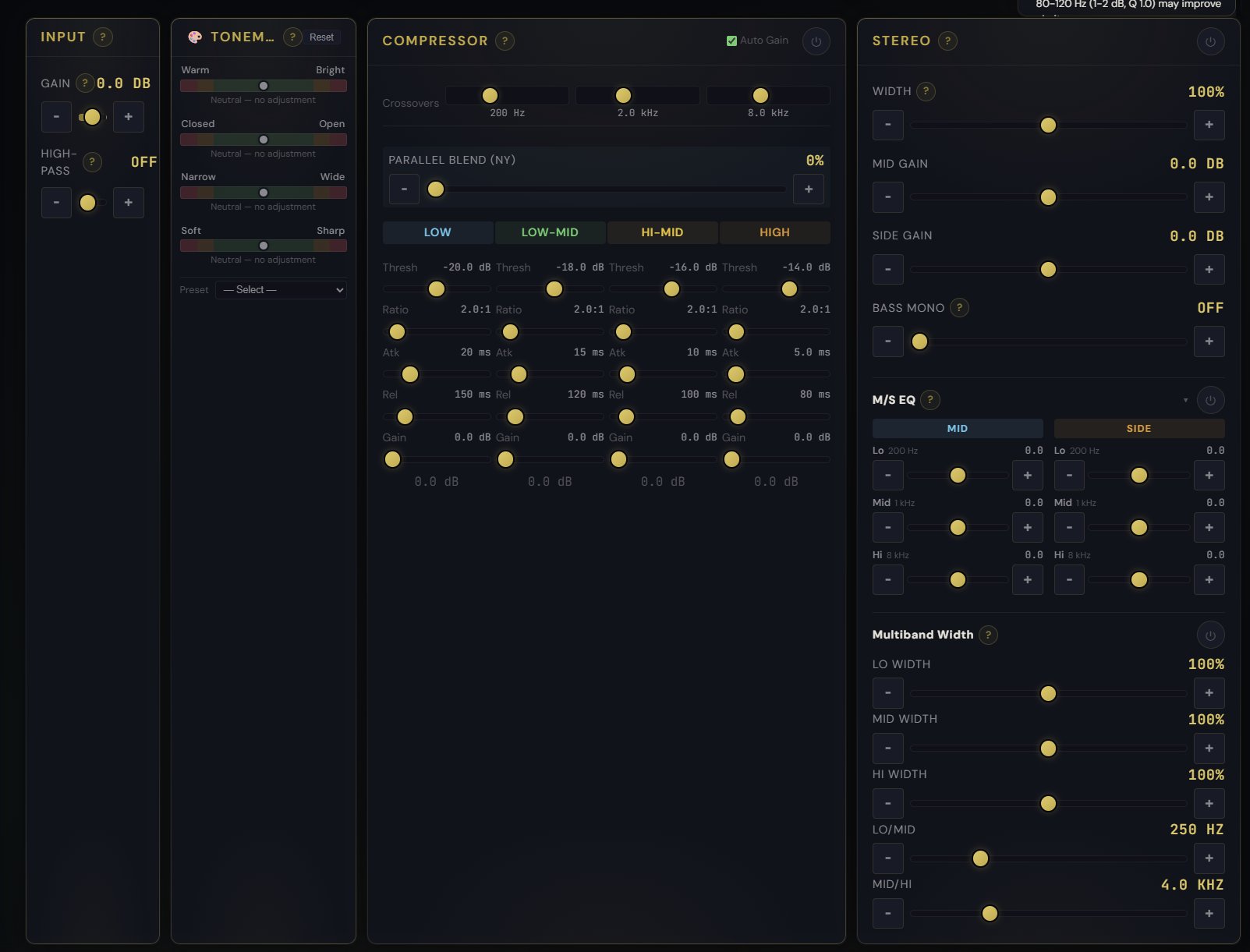
ToneMap: dozens of parameters, one slider
Four perceptual axes (Warm/Bright, Closed/Open, Narrow/Wide, Soft/Sharp) drive dozens of underlying processing parameters at once. Move one slider and you are simultaneously adjusting EQ curves, stereo width, saturation, and transient behavior in a musically coordinated way. This is the easiest way to shape a master if you are not a trained audio engineer. Below ToneMap sits a full four-band compressor with parallel blend, and next to it a stereo section with M/S EQ, multiband width, and bass mono.
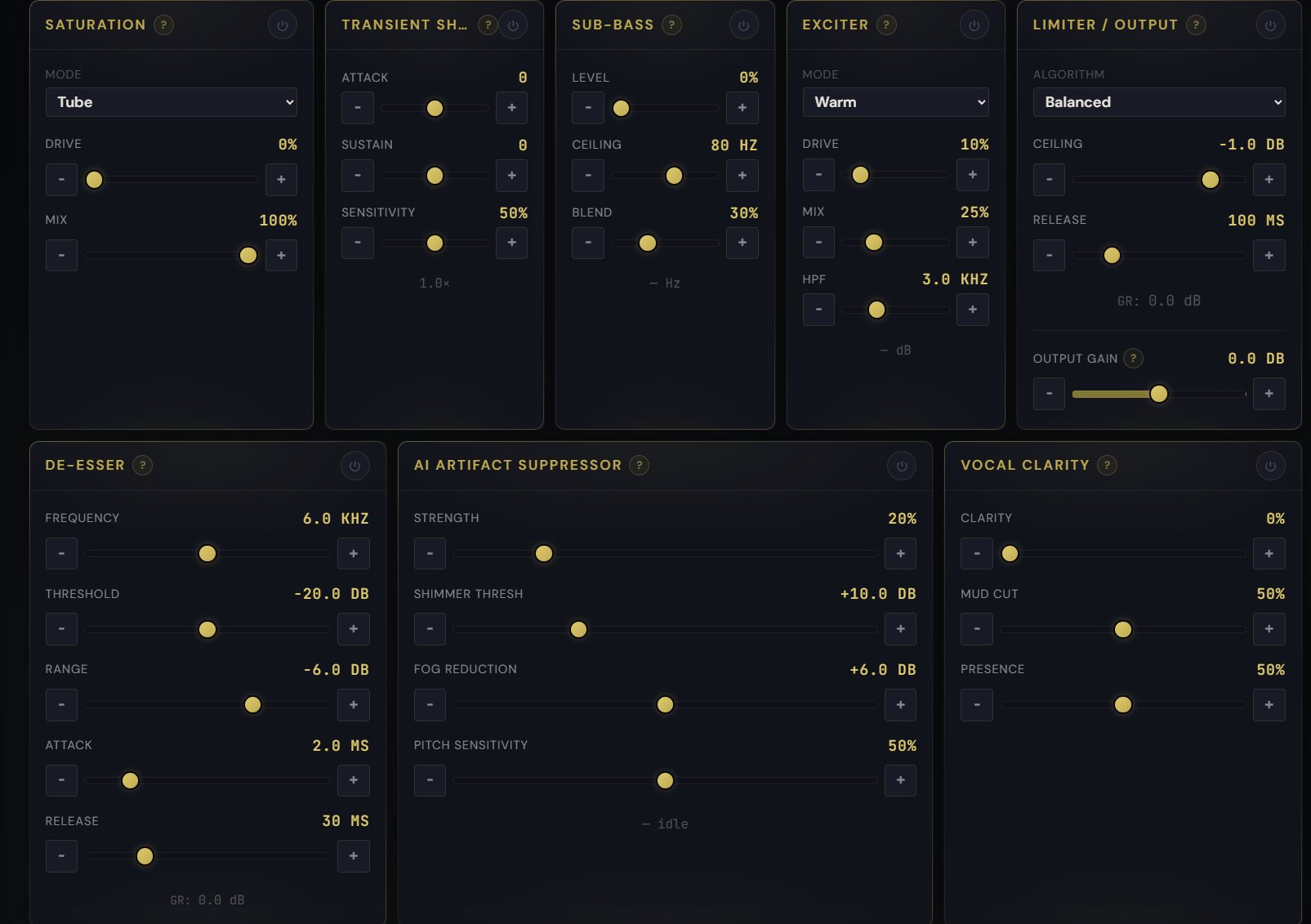
AI-specific cleanup modules
Saturation with Tube, Tape, and Console modes. Transient Shaper for attack and sustain. Sub-Bass synthesis for tracks that lack low-end weight. Exciter with four flavors. De-esser with full threshold / range / attack / release controls. AI Artifact Suppressor with independent Shimmer and Fog reduction and pitch-sensitive behavior. Vocal Clarity for mud cut and presence. And a brickwall limiter with three algorithms and a selectable ceiling.
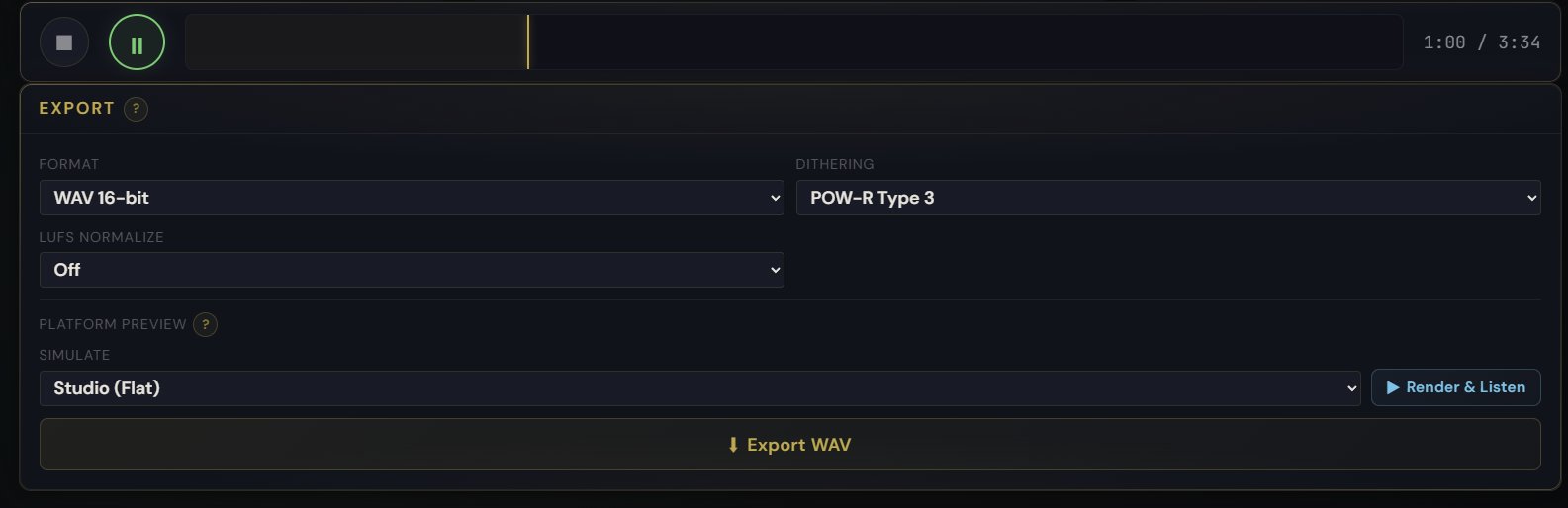
Export with platform preview
WAV (16 or 24 bit), FLAC, or MP3. POW-R dithering options. LUFS normalization to platform targets. And a platform preview simulator that lets you hear how the track will sound after Spotify, Apple Music, or YouTube normalization, before you commit.
Everything runs in the browser. No installer, no plugin chain, no CPU pressure on your machine when you close the tab. Your audio file never leaves the device.
Where This Is Going
The waveform editor is available in Pro Master today. SpectralForge is in private beta and we have not decided yet whether to ship it as a Pro add-on or as a standalone product. That question stays open for now. What is clear is that AI music has room for tools built specifically for AI music, not adapted from the recording world. The artifacts are different, the workflows are different, and the solutions need to be different too.
We are still early. Your feedback is how we find out what to build next.