Does AI Music Need Mastering?
Yes. Here's Why.
“It Sounded Great in Suno”
You just generated the best track you've ever made. The melody works, the vocals hit, the drop lands exactly right. You download it, upload it to Spotify or SoundCloud, and something is off. It sounds quieter than every other song. The highs are harsh. The bass feels strange. On your car speakers, it's even worse.
You didn't do anything wrong. This is what AI-generated audio sounds like before mastering.
Every track that comes out of Suno, Udio, or any other AI music generator shares the same problem: it's unfinished audio. Not because the AI failed, but because generation and mastering are two completely different jobs, and the AI only does the first one.
What Mastering Actually Is
Think of it like photography. Your phone takes a great photo: good composition, right moment, nice colors. But before a photographer publishes that image, they adjust contrast, sharpen the details, correct the white balance, and crop it for the platform. The photo was already good. The edit makes it ready for the world.
Mastering does the same thing for audio. It's the final step where a track gets prepared for real-world listening: on earbuds, car speakers, club systems, and streaming platforms. It adjusts the frequency balance so nothing sounds too harsh or too muddy. It controls dynamics so quiet parts are audible and loud parts don't clip. It sets the right loudness for the platform you're releasing on.
For traditionally recorded music, mastering is standard practice. No professional release skips it. For AI-generated music, it's even more important, because AI audio has specific problems that recorded audio doesn't.
Why AI Music Needs It More
Here's something most people don't realize: Suno and similar tools don't record audio. They predict it. The AI generates music by converting text into sound probabilities, then encoding the result through a neural audio codec. That codec is essentially a compression algorithm, and like all compression, it loses information.
“Just fix it in the prompt” is one of the most common pieces of advice in AI music communities. But it doesn't work. Suno doesn't read your prompt like instructions. It converts text tokens into audio probabilities. Words like “professional studio quality” or “crystal clear mix” have no meaningful audio association in the model. They don't make the output cleaner, louder, or better balanced. The quality ceiling is set by the generation pipeline itself, not by your choice of words. (We covered the full mechanism in Prompt Like a Producer.)
This means the audio problems in your track aren't prompt problems. They're codec problems. And they show up in virtually every AI-generated track as three signature artifacts:
Shimmer
A metallic, glassy harshness in the high frequencies, especially on vocals and cymbals. It's the sound of the codec approximating detail it can't fully reconstruct. You might not notice it on laptop speakers, but on good headphones or studio monitors, it's immediately audible.
Fog
A subtle muddiness in the midrange that makes the track sound like it's being heard through a thin curtain. Individual instruments lose definition. The mix feels blurry rather than clear. This is the codec smoothing over spectral detail it can't preserve.
Bass leak
Low-frequency energy bleeding into the stereo field instead of staying centered. On headphones it creates an odd floating sensation. On a club system, it causes phase cancellation: parts of the bass literally disappear.
These aren't flaws in your prompt or your creative choices. They're built into the generation process itself. Every AI music tool produces them to some degree.
The good news: mastering can significantly reduce all three.
The Loudness Trap
Here's where most people make things worse without realizing it.
You export your track from Suno. You compare it to a professionally released song on Spotify. Yours sounds quieter, thinner, less impactful. The natural instinct is to make it louder. So you find a free limiter plugin, push the volume up, and suddenly it sounds better. Problem solved?
Not quite. What actually happened is this: the limiter compressed your dynamic range (the difference between the quietest and loudest moments in your track) and pushed everything toward maximum volume. It sounds subjectively louder on your headphones. But two things went wrong in the process.
First, AI-generated audio is already compressed by the generation process. A typical Suno track has only about 4 to 6 dB of dynamic range. A professionally recorded track might have 10 to 15 dB. When you push an already compressed signal through a limiter, you're squeezing what little breathing room was left. The result is flat, harsh, and fatiguing to listen to. The exact opposite of professional.
Second, those codec artifacts we just talked about? Shimmer, fog, bass leak? The limiter amplifies all of them proportionally. You didn't remove them. You made them louder.
And here's the final twist: Spotify, Apple Music, YouTube, and every major streaming platform normalizes audio to a target loudness level (around -14 LUFS for Spotify, -16 LUFS for Apple Music). If your track is louder than the target, the platform turns it down automatically. So after all that limiting, your track ends up at the same perceived volume as before, but now with worse artifacts, less dynamics, and more listener fatigue.
Instead of pushing volume up, clean the signal first. Remove the harshness, tighten the bass, clear the midrange fog. Then bring the loudness to the platform target carefully, with headroom intact. This is what mastering does.
What Mastering Can Fix (and What It Can't)
Mastering is powerful, but it's not magic. Being honest about its limits is just as important as understanding its strengths. Here's what you can realistically expect.
✓ What mastering CAN do
Tame shimmer by applying targeted EQ and de-essing in the 6 to 14 kHz range, reducing that metallic harshness without killing the brightness your track needs.
Reduce fog by enhancing midrange clarity with gentle spectral shaping, bringing individual instruments back into focus.
Fix bass leak by collapsing low frequencies below 200 Hz to mono, so the bass hits with impact instead of floating in the stereo field.
Optimize loudness for your target platform, hitting -14 LUFS for Spotify or -16 LUFS for Apple Music without over-compressing.
Improve overall tonal balance, making the track translate consistently across earbuds, car speakers, studio monitors, and phone speakers.
✗ What mastering CANNOT do for AI music
Restore the harmonic detail that the neural codec discarded during generation. The shimmer you hear is the codec's best guess at high-frequency detail. Mastering can reduce it, but can't reconstruct the original harmonics.
Overcome the resolution ceiling of the generation pipeline. This is similar to upscaling a low-resolution photo: you can smooth and sharpen it, but you can't create real detail from pixels that don't exist.
Separate instruments that were never separate. AI music is rendered as a single mixed file. If the vocal and guitar mask each other, mastering can only make compromises.
Fix arrangement problems. If five instruments occupy the same frequency space, the solution is a better generation, not more processing.
Professional mastering can typically reduce artifact severity by 40 to 60 percent. That's often the difference between a track that sounds “obviously AI” and one that sounds “surprisingly good.” But the ceiling is always set by the source material. A great generation with light mastering will always outperform a poor generation with heavy processing. This is why experienced AI music producers treat generation and mastering as two separate skills.
Hear the Difference
Theory is useful, but your ears are the real judge. Here's a real Suno-generated track, before and after mastering with MasterForge. Use headphones or proper speakers for the full effect.
What You Can Do Right Now
You don't need expensive plugins or years of audio engineering experience to improve your tracks today. Here are three things that make an immediate, audible difference.
1. Stop chasing loudness
This is the single most impactful change you can make. If you're running your track through a limiter or maximizer before uploading, stop. Your track doesn't need to be as loud as possible. It needs to be clean and properly balanced. Streaming platforms normalize loudness anyway, so pushing harder only amplifies artifacts and destroys dynamics. Export your track from Suno as-is and focus on the quality of the signal, not the volume.
2. Listen on three different systems before you publish
The track that sounds perfect on your studio headphones might sound completely different on a Bluetooth speaker, in a car, or through cheap earbuds. AI audio artifacts behave differently on each system. Shimmer is most noticeable on detailed headphones. Bass leak reveals itself on stereo speakers. Fog becomes obvious when you compare your track to a commercial release on the same system. If something sounds off on two out of three systems, it's a real problem that mastering should address.
3. Use a mastering tool that understands AI audio
This is where generic mastering tools fall short. Most mastering software and online services are designed for recorded audio: vocals captured by a microphone, instruments recorded through a preamp, mixes built in a DAW. AI-generated audio has a fundamentally different spectral profile, and it needs tools built for that profile.
MasterForge was built specifically for this. Here's what the workflow looks like in practice.
Know what you're working with
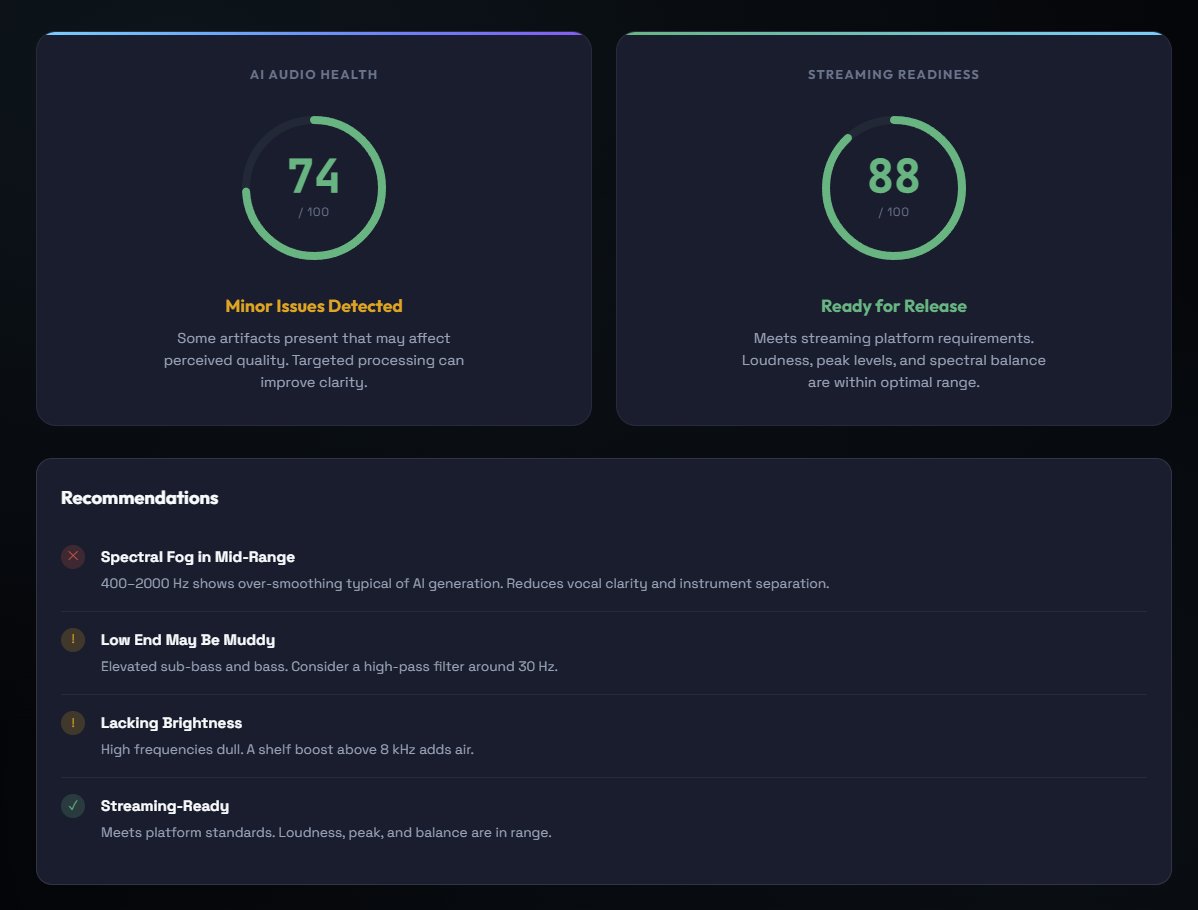
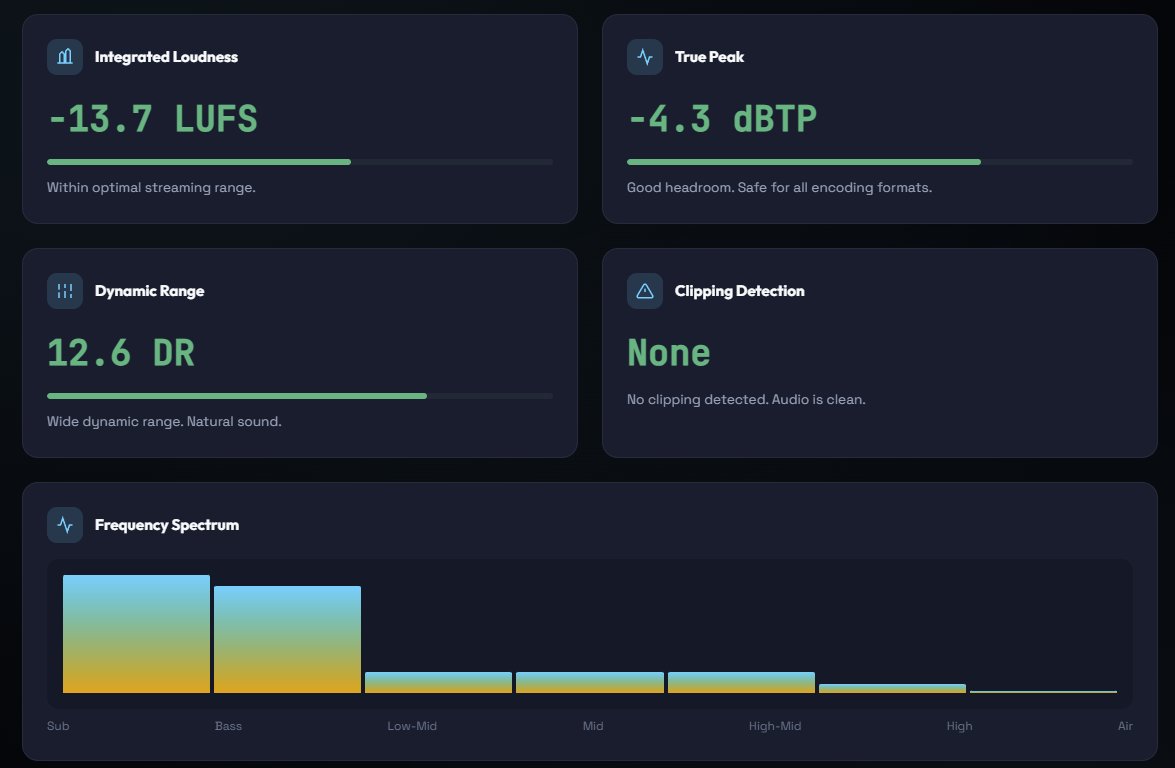
Start with the free Audio Analyzer. Upload your track and get an immediate breakdown: an AI Audio Health score, a Streaming Readiness score, and specific recommendations for what needs attention. The analyzer detects shimmer, spectral fog, bass coherence, dynamic quality, and noise floor individually. It also checks loudness, peak headroom, dynamic range, spectral balance, and clipping. No guessing, no expensive monitoring equipment. Just honest data about your track.

Clean the AI artifacts first
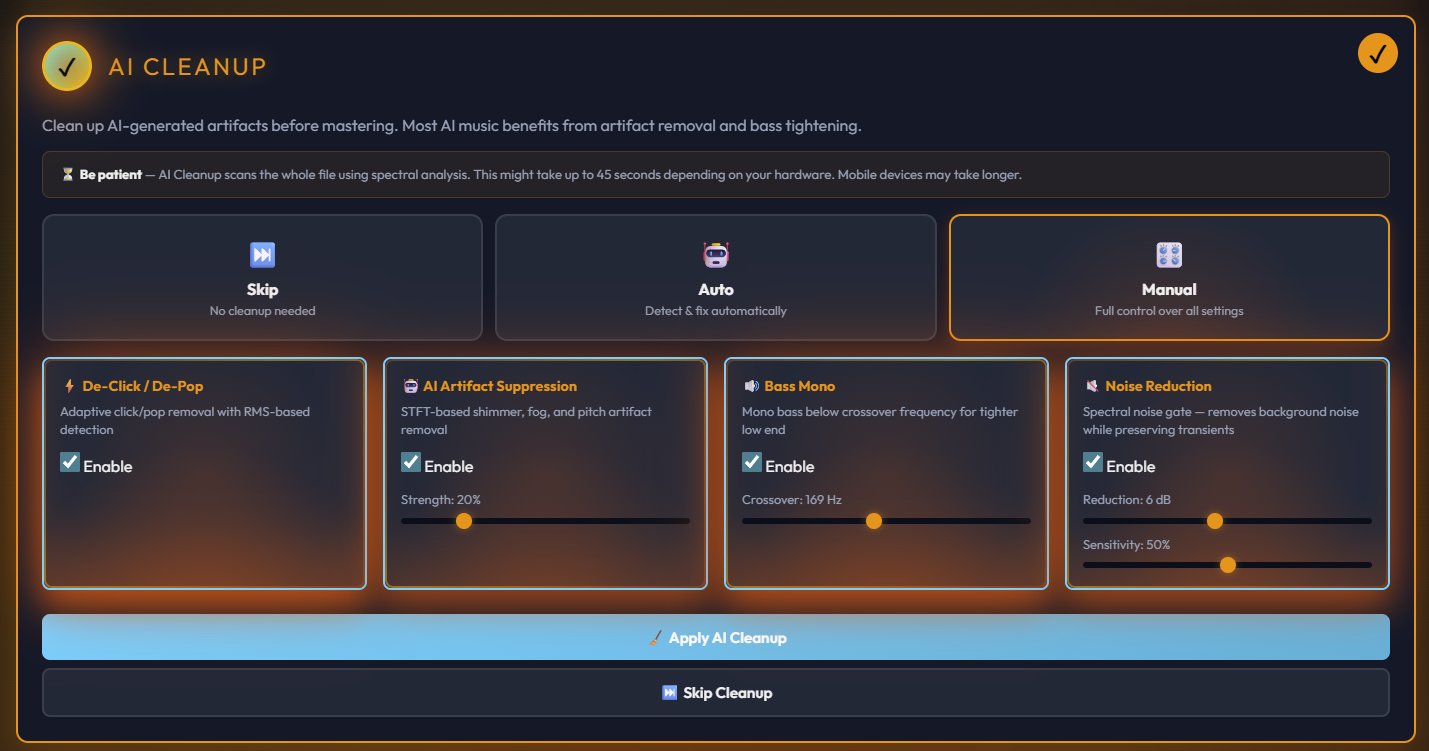
When you load a track into the MasterForge Starter, the first thing you see is the AI Cleanup stage. This is the step that separates AI-aware mastering from generic mastering. You can run it in Auto mode (detect and fix automatically) or Manual mode (full control over each parameter). The cleanup handles four specific problems: de-click and de-pop removal, STFT-based AI artifact suppression for shimmer and fog, bass mono processing to tighten the low end, and spectral noise reduction. For most tracks, Auto mode handles this well. If you want precision, Manual lets you adjust the strength and crossover frequency for each processor individually.
Choose your preset
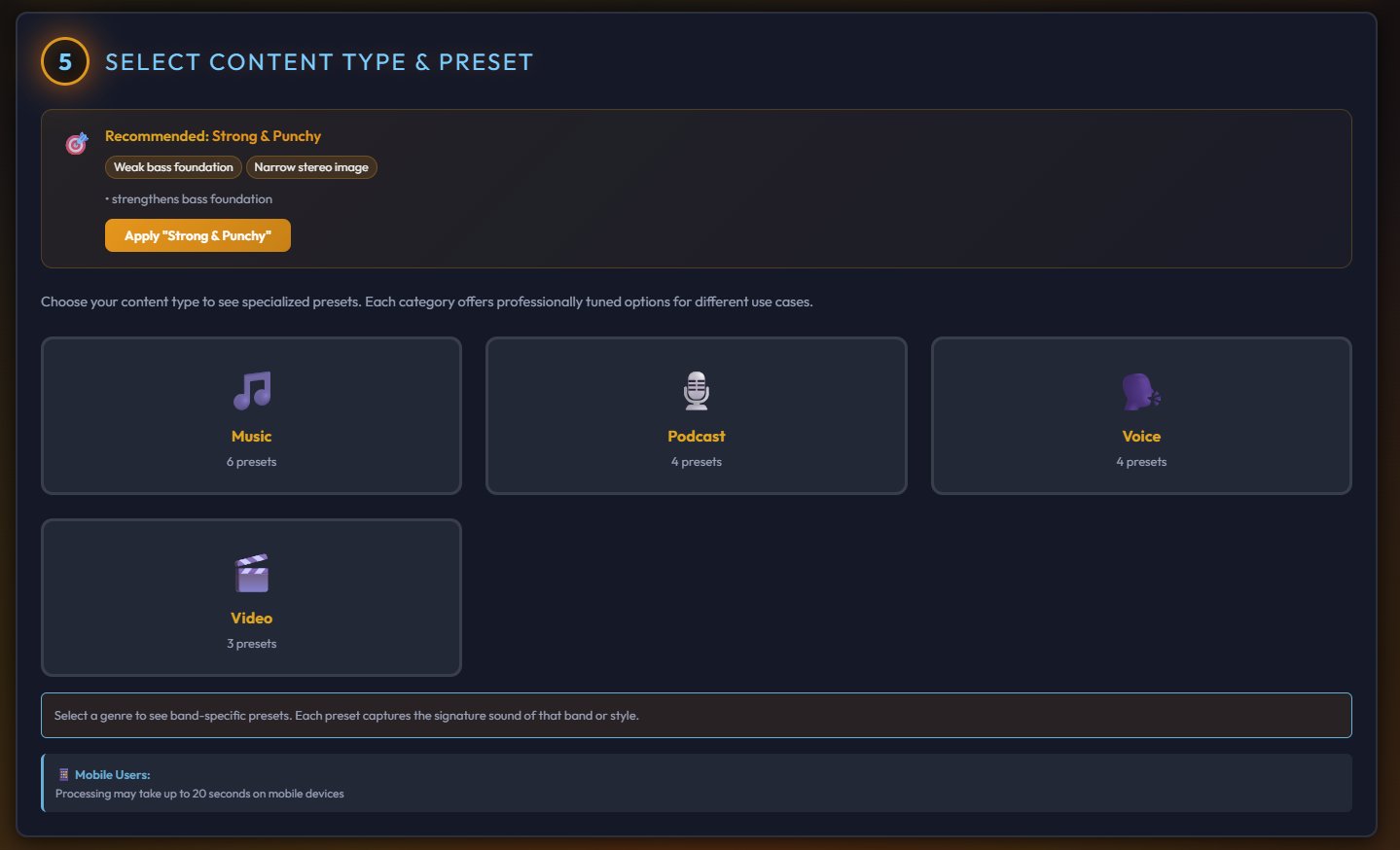
After cleanup, you select a content type (Music, Podcast, Voice, or Video) and a genre-specific preset. Each preset is professionally tuned for its genre, with over 20 options available. The system also recommends a preset based on what it detected in your audio. One click applies a complete mastering chain calibrated for that style.
Choose where people will hear it
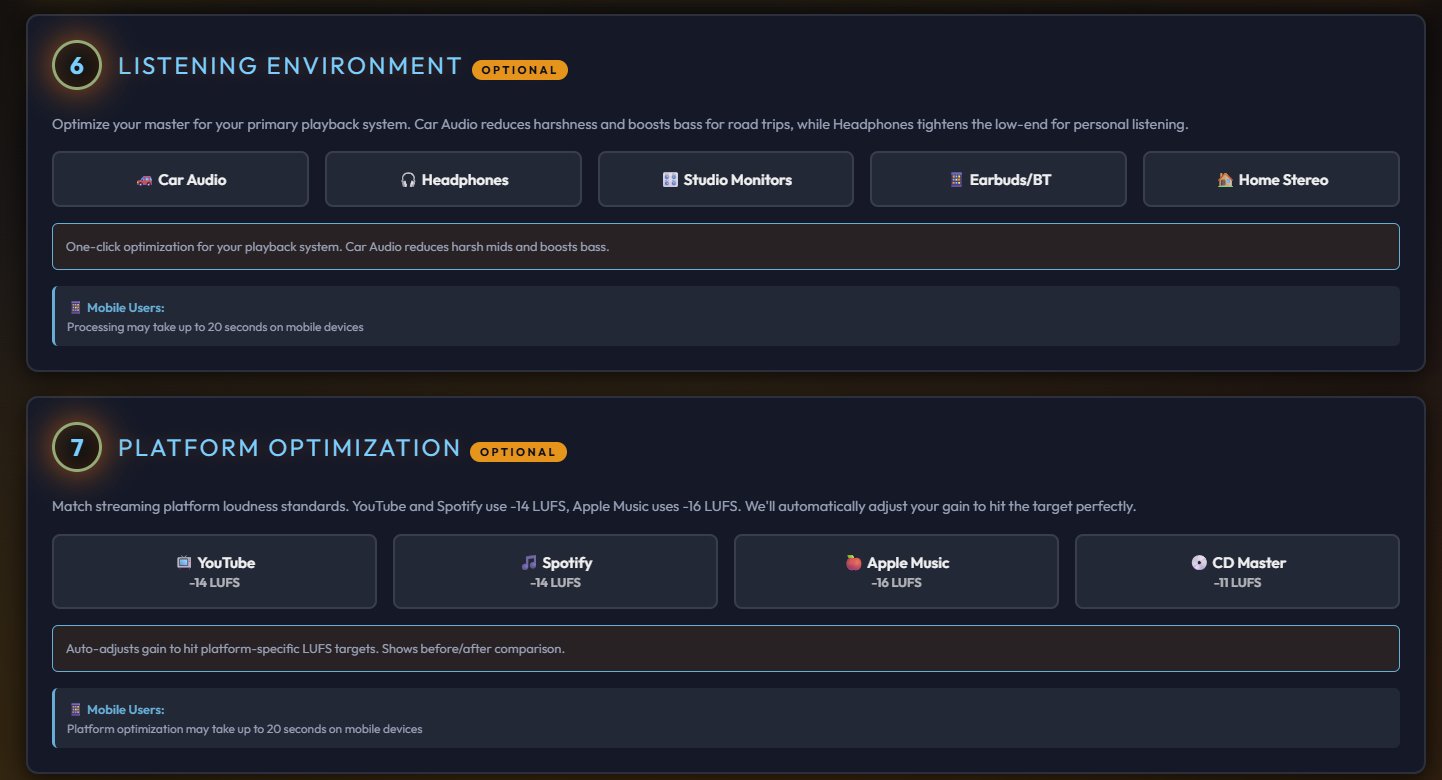
The MasterForge Starter includes a listening environment selector (Car Audio, Headphones, Studio Monitors, Earbuds, Home Stereo) and platform optimization (YouTube at -14 LUFS, Spotify at -14 LUFS, Apple Music at -16 LUFS, CD Master at -11 LUFS). These aren't just labels. Each setting adjusts the processing to sound right on that specific system and hit the exact loudness target for that platform.
Fine-tune if you want to
Every preset sets all parameters automatically, but the full tweaking section is there if you want to adjust. A 9-band EQ, multiband compression, transient shaping, mid-side processing, per-band saturation, reverb, and a brickwall limiter. All optional. The presets already sound good. Tweaking is for perfectionists.

Compare and export
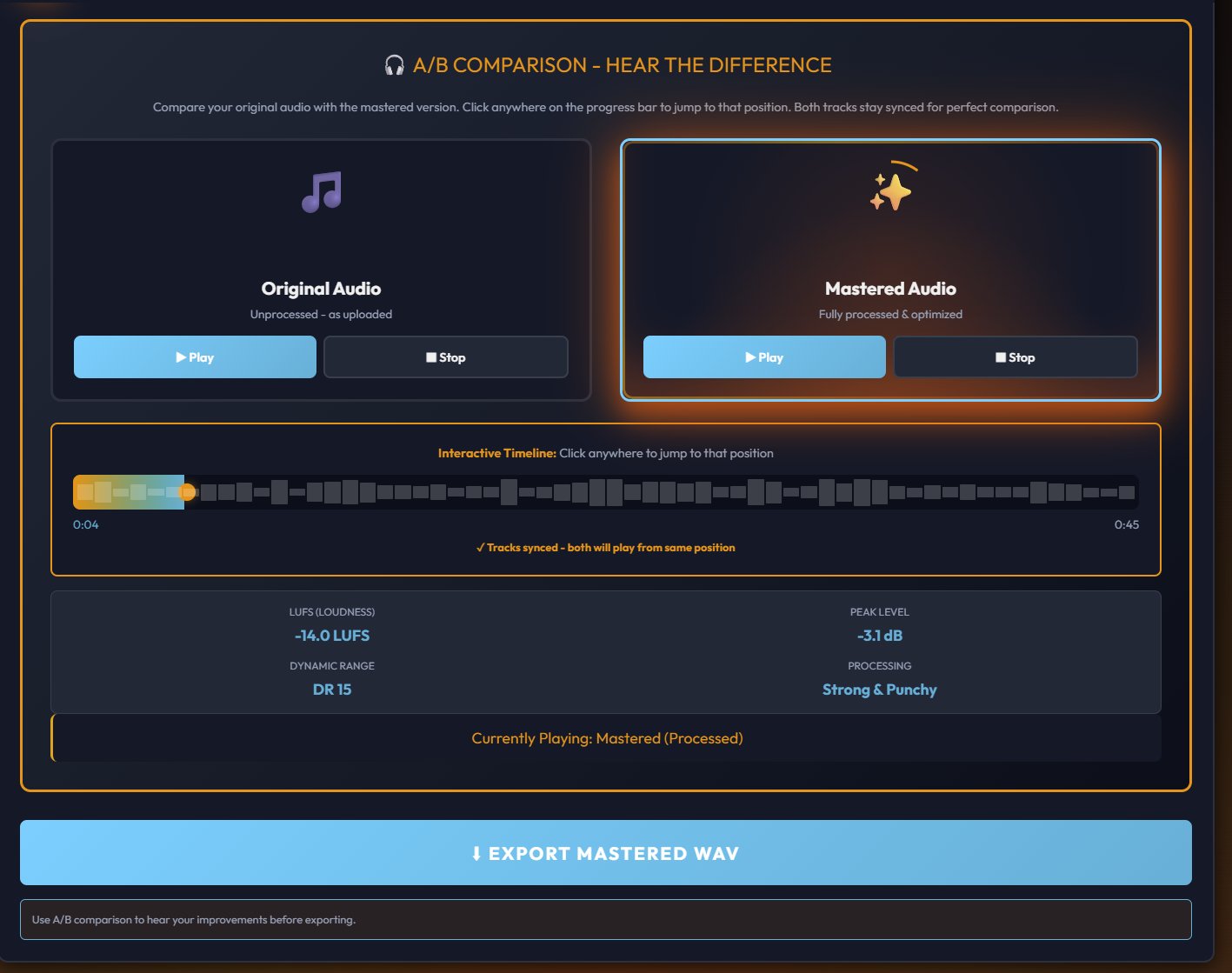
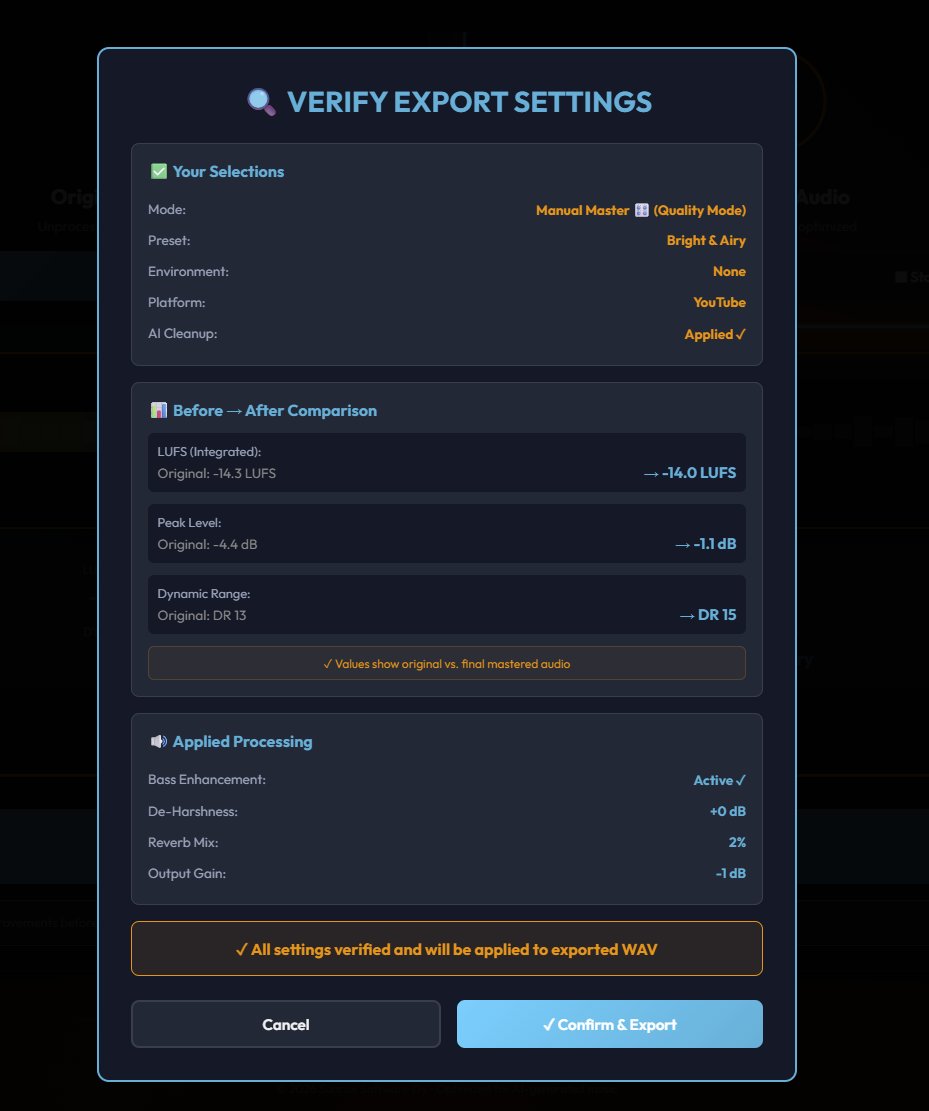
Before you commit, the A/B comparison lets you switch between your original unprocessed audio and the mastered version with a synced timeline. Hear exactly what changed. When you're satisfied, the export verification shows you the before and after measurements: LUFS, peak level, dynamic range, and all applied processing at a glance. Confirm and export.
You can try the full MasterForge Starter workflow free at masterforge.app. Upload a track and hear the difference for yourself.
For producers who want complete control over every parameter, the Pro Master is a dedicated real-time DSP engine with a 31-band parametric EQ, ToneMap (which adjusts dozens of settings simultaneously so you can shape your sound without deep engineering experience), multi-stem processing for up to 8 separate tracks, a sub bass generator, exciter, de-esser, AI artifact suppressor, vocal clarity engine, and platform-specific preview modes. Final export is 24-bit WAV.
The Producer's Checklist
Let's bring it all together. Does AI music need mastering? Yes. Not because there's something wrong with AI music, but because mastering is part of the production process for all music. AI just makes it more important, because the generation pipeline introduces specific problems that mastering is uniquely positioned to solve.
Here's the short version:
AI music generators create the composition and the performance. That's remarkable on its own. But they don't master the output. The audio comes out with codec artifacts, inconsistent frequency balance, and loudness that isn't optimized for any platform. These are solvable problems.
Don't try to fix audio quality with prompts. The generation pipeline determines the quality ceiling, not your word choices. Don't chase loudness with limiters. Clean first, then optimize volume for your target platform. Listen critically on multiple systems. Your ears are the best diagnostic tool you have. Use mastering tools designed for AI audio. The problems are specific, and the solutions should be too.
The creators who consistently release tracks that sound polished, professional, and competitive with traditionally produced music aren't using secret prompts or hidden settings. They're treating their AI-generated audio the same way any producer treats a raw recording: as a starting point that needs finishing.
That finishing step is mastering. And it makes all the difference.