What it is
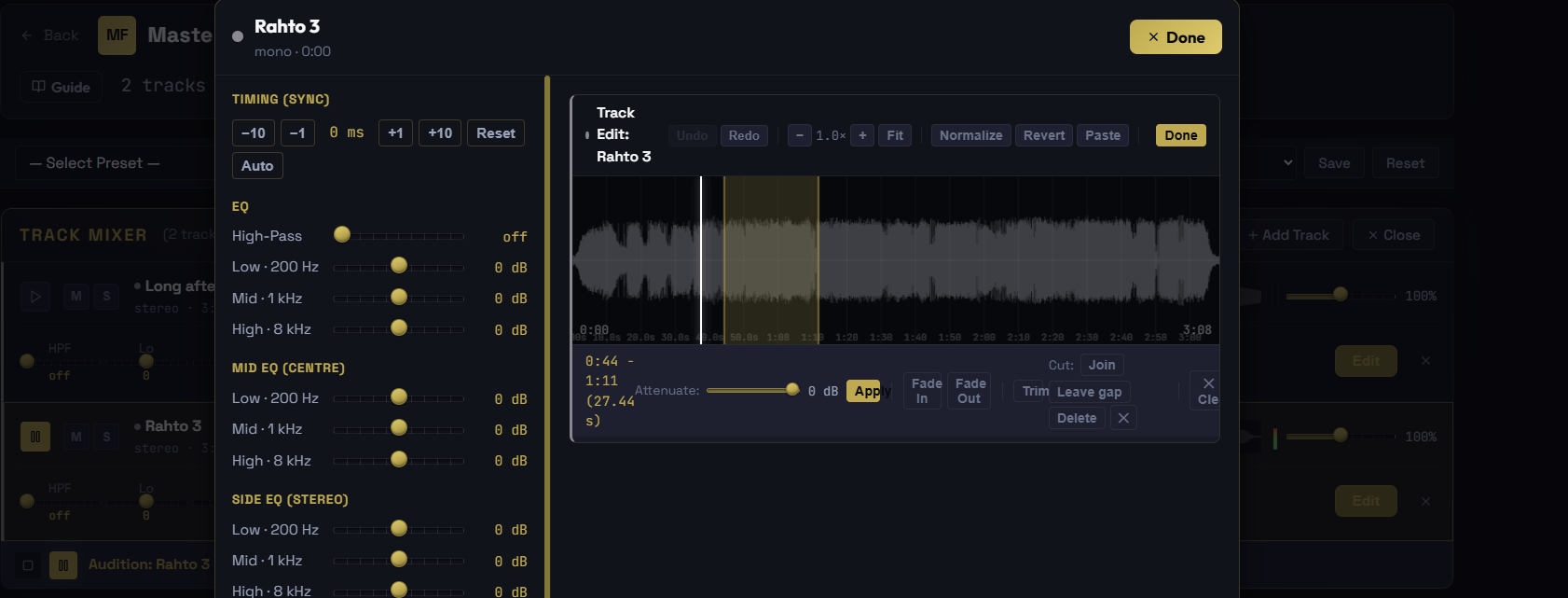
Inside each stem's editor is a large, zoomable waveform with a full set of audio editing tools. It turns the stem mixer into a light editor, so you can fix timing and shape each part on its own before it sums into the master, without leaving Pro Master.
Line stems up in time
Stems that drift out of sync are the classic problem with separated tracks. Nudge a stem earlier or later by the millisecond until it sits right, or click Auto-align and Pro Master matches it to the rest of the mix for you. The offset is a playback setting, not a destructive edit, so it is always reversible.
Edit the audio
- Fade In and Fade Out across any selection
- Cut a selection with a choice of what happens to the gap: close it, leave a silent gap, or delete
- Paste the cut audio anywhere on the stem
- Trim a stem down to just a selection
- Normalize the whole stem to a clean peak
- Attenuate a selection by a set number of dB
Nothing is ever lost
Every edit is on a 50 step undo and redo stack, and a Revert button restores the pristine original stem at any time. When you are happy, Bounce to Master renders every stem exactly as you edited it, so what you hear is what you export.