What it is
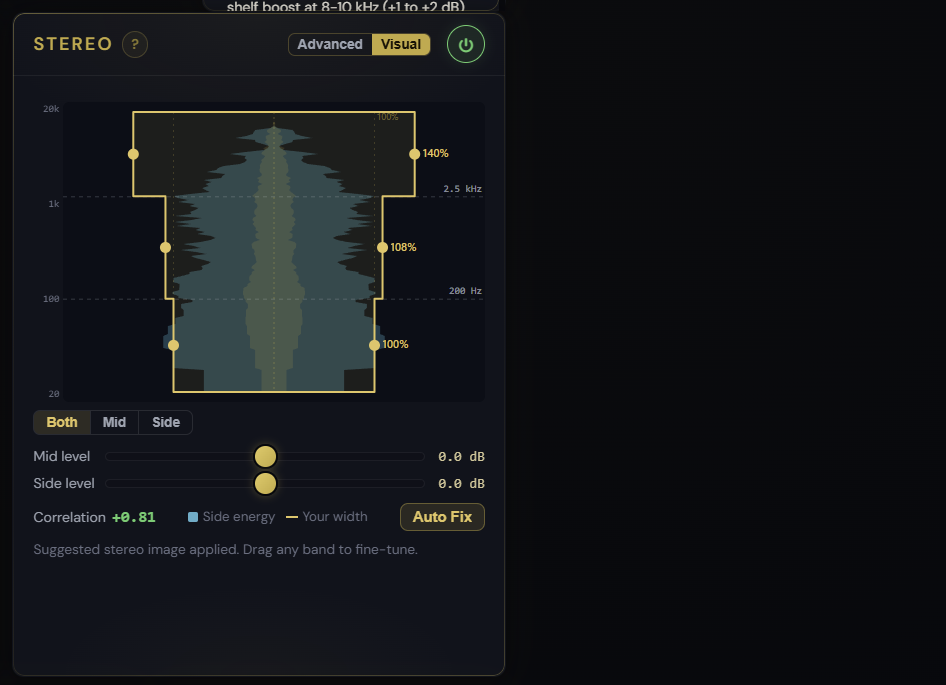
A stereo image controller with two views over the same engine. The Visual view draws your stereo image as an hourglass on a vertical frequency axis, so you can see and drag where the width sits. The Advanced view exposes the full set of controls: overall Width, Mid / Side gain, a Bass mono crossover that sums low frequencies to mono, and a 3-band Multiband Stereo Expander with independent widths per Lo / Mid / Hi band.
Visual view
- Drag a band to set its width: narrow the bass, widen the mids, open the highs, with the width percentage and frequency shown live as you drag
- Drag the dashed lines to move the crossovers and the bass-mono point
- The real Mid and Side spectrum is drawn behind the shape, so you can see where the stereo content actually is before you touch it
- Switch between Both / Mid / Side views, with separate Mid and Side level controls
- Auto Fix suggests a starting point from your track
Advanced view
- Width 100% is unchanged; > 100 widens the sides, < 100 narrows toward mono
- Mid gain brings the centre forward or back; Side gain does the same for the stereo image
- Bass mono crossover sums everything below the frequency to mono: set around 100-150 Hz for club / vinyl, lower for streaming-only
- Multiband Stereo Expander: set Lo/Hi crossovers and Lo/Mid/Hi widths separately. Common: Lo width 80-100 (bass stays tight), Mid width 100-110 (vocal sits forward), Hi width 110-130 (air widens)
What it affects
Translates the master to systems with different stereo behaviour. Bass mono fixes phase issues on systems that sum to mono (club PA, vinyl cutting head, AM radio, mobile speakers). Multiband expansion lets you keep the centre vocal mono-safe while widening reverb and cymbal tails. Pair it with the Stereo Correlation meter in the Mastering Report to verify mono compatibility after the moves. For continuous, frequency-by-frequency control of width and centre tone, see Precise Stereo.