What it is
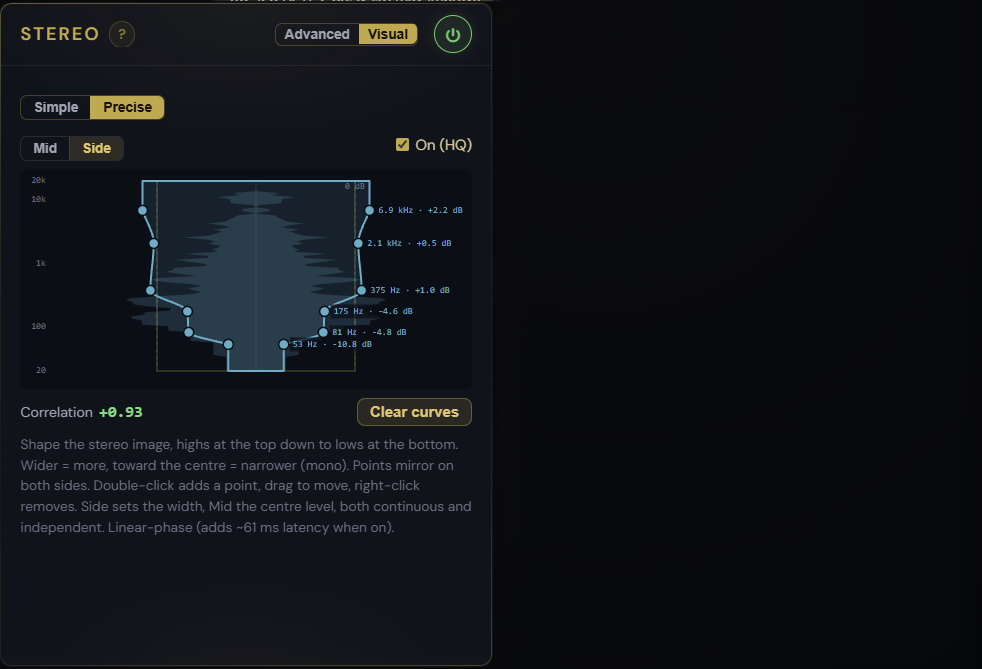
A continuous stereo imager. Instead of three fixed bands, Precise mode lets you shape the whole stereo image as a smooth funnel across the entire frequency range. Draw a Side curve to widen or narrow the picture frequency by frequency, and a separate Mid curve to shape the centre tone like an EQ on the middle. Both curves are continuous and independent, and the live Mid and Side spectrum sits right behind them so you always know where the stereo content is.
How to use it
- Open the Stereo panel, switch the Visual view to Precise (the 3-band Simple hourglass stays available)
- Pick the Side curve to set width: lift a point to widen that frequency, pull it down to move it toward mono. Points mirror on both sides, so the image stays balanced
- Pick the Mid curve to shape the centre tone, independent of the width
- Read the exact frequency and level off each point as you drag
- A neutral (flat) curve leaves the signal untouched, so you can dial in only the range you want to treat
What it affects
Precise mode runs a linear-phase Mid/Side engine, the same technique as the Linear Phase EQ, so it stays phase-coherent and mono-safe: a flat curve is bit-transparent and centre content is preserved. It is applied to your exports too, and the curves are saved in your presets and .mfproj project files. Use it to widen only the air on top while keeping the bass tight, to narrow a harsh side resonance without collapsing the whole image, or to shape the centre tone without a separate EQ pass. For quick 3-band moves, the Stereo Imager and its Visual hourglass are still the fastest way in.