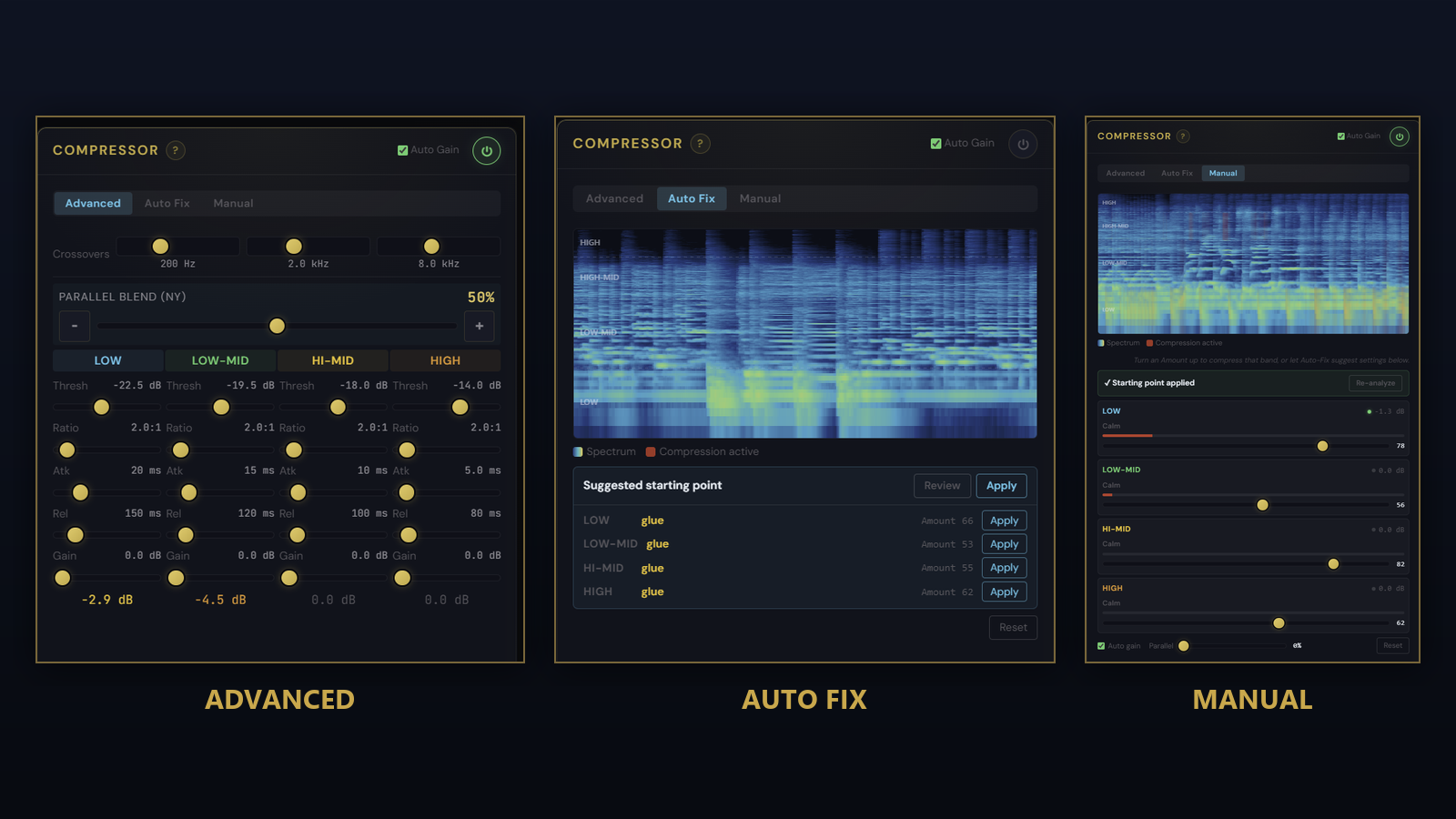
The 4-band multiband compressor is one of the most powerful tools in Pro Master, and one of the hardest to learn. Twenty-three controls, four bands, and no obvious place to start. Most people either skip it or paste in a preset they do not really understand. The Visual Compressor adds two simpler ways in, so you can shape your master without first learning what every knob does.
Three ways in
A toggle at the top of the Compressor panel now offers Advanced, Auto Fix, and Manual. Advanced is the full panel you already know, unchanged. The other two sit on top of the same engine, so whatever you set in one is reflected in the others.
Auto Fix
Auto Fix is the one most people will reach for. Load a track, switch to Auto Fix, and it analyses the actual audio: per band, where the level sits and how dynamic the track is across its whole length. It then places a tasteful multiband starting point that genuinely engages, rather than a generic setting that does nothing on already loud material. One click on Apply and you hear it. A live spectrogram behind the panel shows a red wash exactly where each band is being compressed, so you can watch the tool work.
Manual
Manual keeps it visual but hands you the controls. Each band gets a single Amount slider, gentle to firm, over the same live spectrogram with the red gain-reduction overlay. The sliders run the full width of the panel for fine adjustment by ear. When you want the full set of threshold, ratio, attack, and release, Advanced is one click away and shows exactly what Auto Fix or Manual set.
Also in this release
Surgical Cleanup gets a fix: soloing a band now plays at full listening level, so you no longer raise your hardware volume to hear it and then get a sudden blast when you Apply. The Solo and Cut buttons also stay responsive every time you open the dock. And the waveform edit tool is now clearly labelled Repair, grouped with the other tool buttons.