What it is
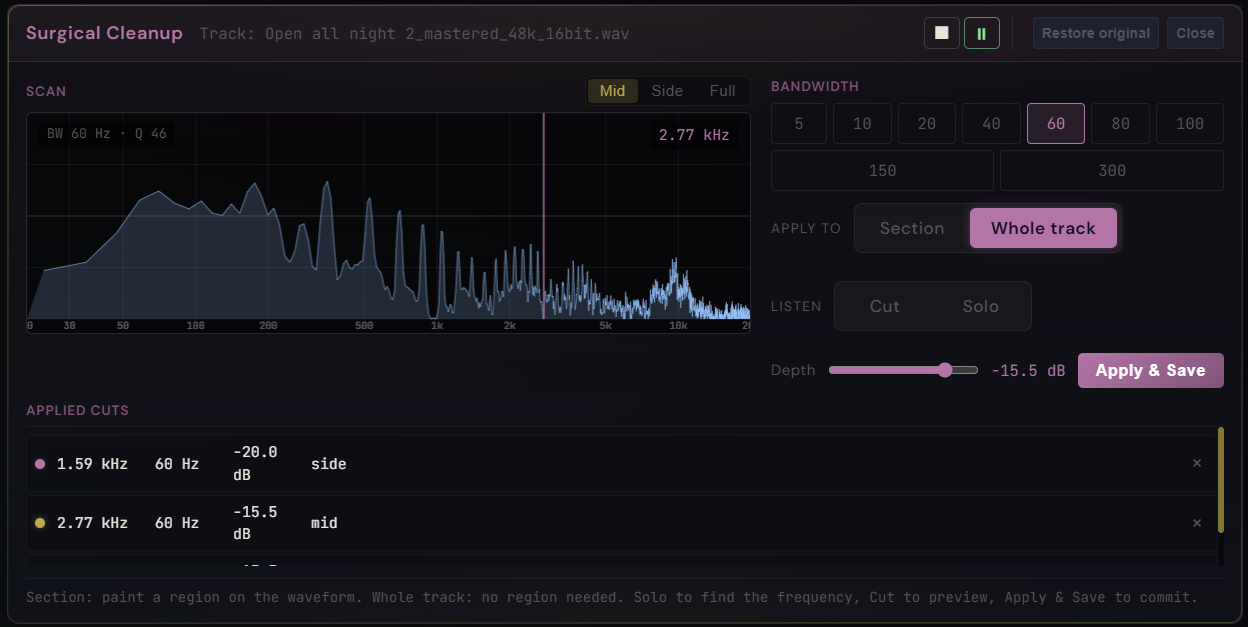
A surgical-precision notch tool inside Pro Master for removing isolated tonal problems: metallic resonances, isolated hiss bands, sibilance peaks, narrow-band buzz. Two listening modes work together. Cut mode previews a peaking notch on the master output, so you hear what the cut will sound like in context. Solo mode flips the listening — master goes silent and you hear only the bandpass-filtered slice of the audio around the scanner frequency. Move the scanner, the slice moves with it. When the slice gets loudest, that's the frequency that was sitting too proud in your mix.
How to use it
- Open the Surgical dock from the main waveform toolbar
- Choose Section (paint a region on the waveform) or Whole track (no region needed)
- Pick a bandwidth (60 Hz is a good start, narrow to 20 Hz once you are close)
- Toggle Solo and drag the scanner — the offender jumps out as the loudest band
- Toggle Cut to preview the notch on the full mix at the depth you set (up to -80 dB)
- Press Apply & Save to bake the cut into the buffer — it lands in the History panel and the Applied Cuts list
What it affects
Surgical removes narrow tonal artifacts without smearing the surrounding music. Cuts are applied offline through an M/S-routed filter (Mid, Side, or Full channel scope) and written back into the source buffer with a 5 ms cosine crossfade at the region edges. Up to -80 dB depth for full kills, multiple cuts per track, full undo / redo, and a Restore original button that rolls every surgical edit on the track back to the audio you loaded.