What it is
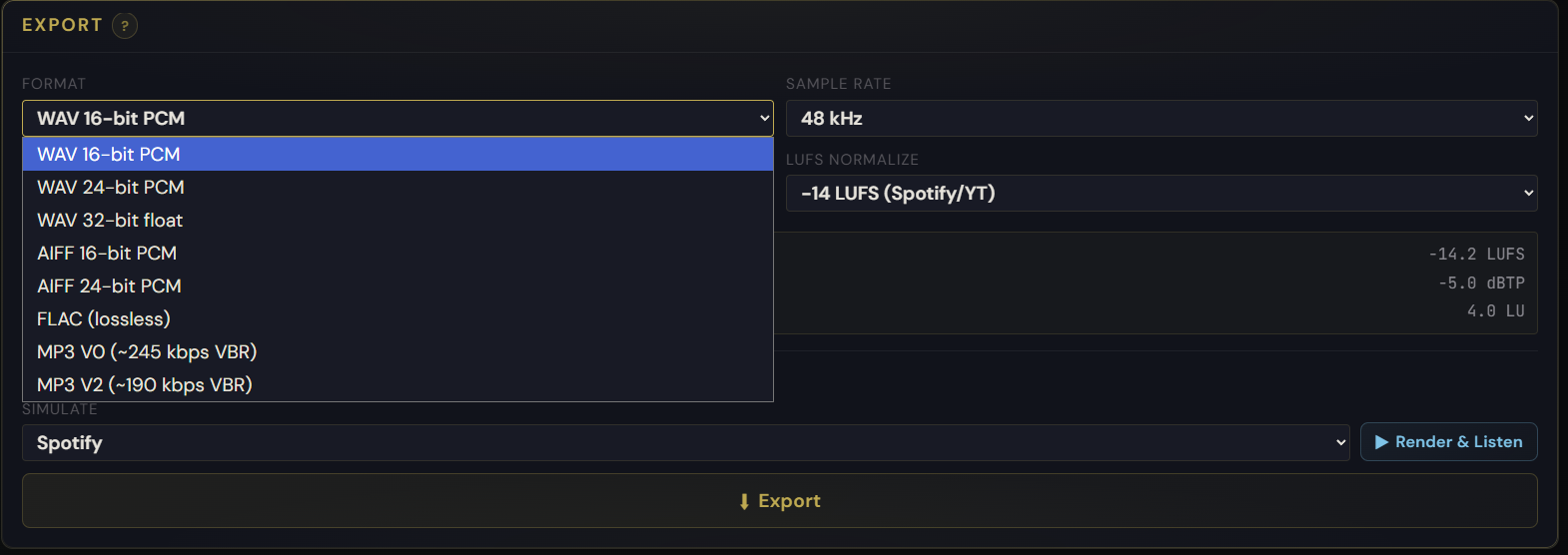
Eight export formats and five sample rates per export. Formats: WAV 16-bit PCM, WAV 24-bit PCM, WAV 32-bit float, AIFF 16-bit, AIFF 24-bit, FLAC (lossless), MP3 V0 (~245 kbps VBR), MP3 V2 (~190 kbps VBR). Sample rates: 44.1, 48, 88.2, 96, 192 kHz. LUFS Normalize targets a specific Integrated LUFS, and Platform Preview auditions the playback path of streaming platforms before export.
How to use it
- Pick a format — 24-bit WAV for archive, 32-bit float for further processing, FLAC for lossless distribution, MP3 V0 for previews
- Pick a sample rate — 48 kHz is standard for streaming, 44.1 for CD, 96/192 for hi-res
- (Optional) Enable LUFS Normalize and pick a target (-14 for Spotify/YouTube, -16 for Apple Music, or custom)
- (Optional) Enable Platform Preview to hear what the file will sound like after the platform's encoding chain
- Export — filename auto-includes source name, sample rate, and format tag (e.g.
mysong_mastered_48k_24bit.wav)
What it affects
One project, multiple deliverables. Export a 24-bit WAV master for the label, a FLAC for lossless distribution, an MP3 V0 for a client preview, and a Spotify-LUFS-normalized 16-bit version for upload — all from the same session, with consistent settings, and a Mastering Report attached to every export. LUFS Normalize and Platform Preview sync automatically for streaming targets so you don't have to remember the spec for each service.